
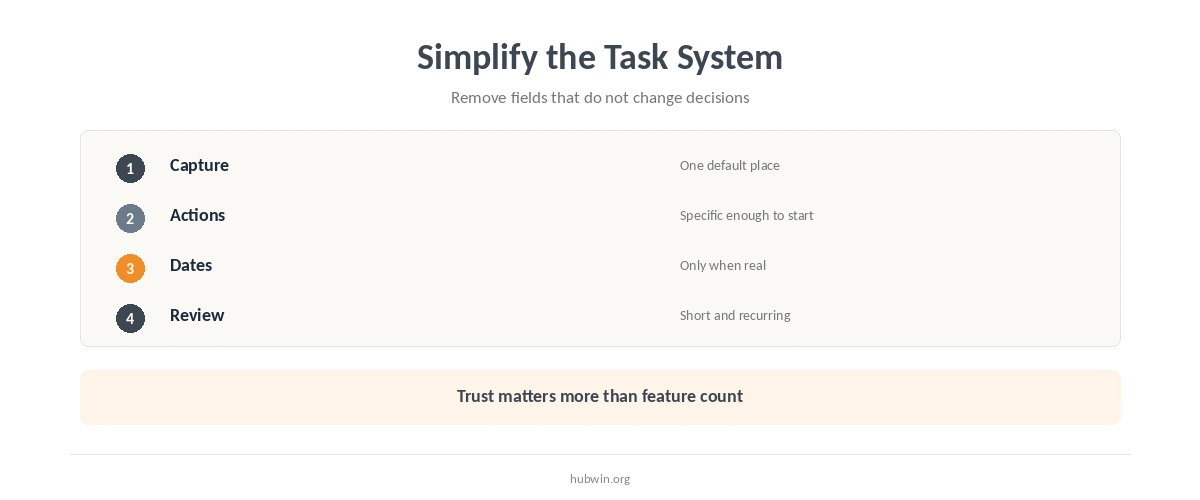
To keep track of tasks without overcomplicating, separate four jobs. Capture what appears, clarify the next action, put date-specific work on the calendar, and review the active list often enough that you trust it. Complexity grows when one list tries to do every job at once.
You do not need a new app for this approach. It can live in paper, a notes tool, or a task manager you already use. The important part is that it supports your daily work-from-home schedule. The system should not require maintenance all day.
Keep Track of Tasks Without Overcomplicating with One Capture Point
Choose one default place for new tasks. You can still receive work through email, chat, meetings, and documents, but convert the action into one trusted capture point. Multiple permanent inboxes create a search problem before the work even starts.
For remote work, this matters because messages already compete for attention. Pair the capture point with managing distractions at home. Use handling interruptions so every incoming request does not become an immediate task switch.

Write the Next Visible Action
One way to keep track of tasks without overcomplicating is to write what you can actually do next. “Quarterly report” is a topic. “Draft the three section headings” is an action. You do not need to break every project into dozens of steps. Define enough detail to remove ambiguity when you start.
This works well with avoiding procrastination while working from home. It also helps after interruptions. Avoiding context switching is easier when the return point is visible instead of stored only in memory.
Use the Calendar Only for Work That Belongs to a Time
Keep meetings, deadlines, appointments, and intentionally scheduled work on the calendar. Do not force every possible task into a time slot if that creates constant rescheduling. The active list can hold flexible work while the calendar protects real commitments.
If time blocks help your role, use time blocking at home. If the schedule changes often, keep blocks broader. Use separate focus and call modes rather than rebuilding the calendar after every interruption.
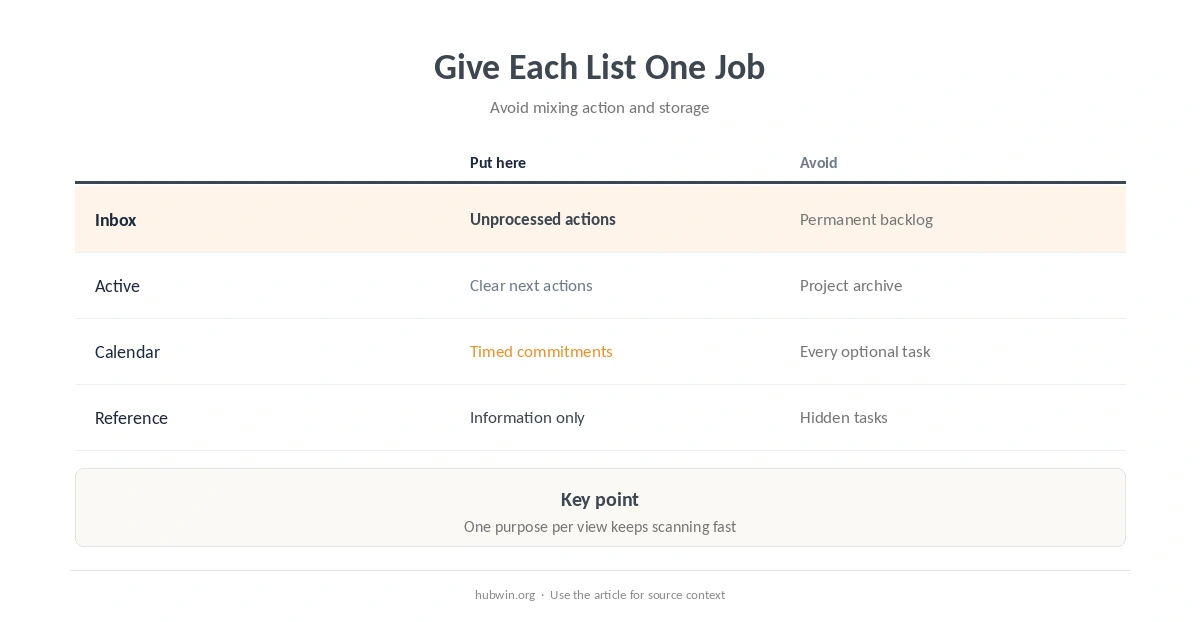
| Place | Put here | Do not turn it into |
|---|---|---|
| Inbox | New unprocessed actions | A permanent backlog |
| Active list | Clear next actions | A project archive |
| Calendar | Date-specific commitments | Every optional task |
| Reference | Information with no action | A hidden task list |
Keep the Active List Small Enough to Scan
A giant list can be technically complete and still be hard to use. Keep the current view focused on work you may reasonably act on soon. Move someday ideas, inactive projects, and reference material out of the daily decision surface.
Use weekly planning for remote work to decide what becomes active. Check the process with the work-from-home productivity checklist. Then use protecting deep-work time to connect the list to actual working conditions.
Review Progress Instead of Constantly Rewriting Priorities
A recurring review is more useful than continuous list grooming. Check what is done, what is blocked, and what still deserves attention. Research on goal-progress monitoring found that interventions designed to increase monitoring also improved goal attainment on average. Some effects were stronger when progress was physically recorded or reported.
That does not mean more tracking is always better. Keep the review short. Use an end-of-day checklist or a faster desk startup as fixed moments to update the system.
Keep Track of Tasks Without Overcomplicating by Removing Fields
If you want to keep track of tasks without overcomplicating, periodically remove fields you do not use to make decisions. A second way to keep track of tasks without overcomplicating is to keep only the views you actually review. Priority, estimate, context, owner, status, and due date can all be useful. They do not all need to exist on every personal task.
The same rule applies to tools. Simple habits versus expensive gear is not only about hardware. A lightweight process you trust is more useful than a feature-rich system you avoid maintaining. Keep enough structure to support productive remote work, then stop.
How We Research Simple Task Tracking
HubWin does not endorse a specific task-management app. We use research on goal-progress monitoring, implementation intentions, and task switching to support the workflow. The editorial system stays deliberately lightweight.
Sources reviewed October 9, 2026: Harkin et al. meta-analysis on monitoring goal progress, Wang et al. meta-analysis on mental contrasting with implementation intentions, and Vandierendonck et al. review of task-switching costs. Read how HubWin researches articles.
No. A paper list or simple notes tool can work if you have one trusted capture point, clear next actions, and a recurring review.
No. Use dates when the task is genuinely time-specific. Artificial dates can make the system noisy and require unnecessary rescheduling.
Use only enough levels to change a decision. If three labels rarely change what you work on, one active list plus a few priorities may be simpler.
Review often enough that you still trust it. Many people benefit from a brief daily check plus a broader weekly review, but the exact rhythm should match the pace of the work.