
To batch tasks when working from home, group work that uses a similar mental mode, tool, or communication channel. Then handle that group in a defined window. The point is to reduce unnecessary switching, not to postpone every small task until a giant backlog appears.
Task batching works best beside a broader plan. Use the daily schedule guide or time blocking to decide where a batch belongs. Then protect that window from avoidable interruptions.
Batch Tasks When Working from Home by Similar Context
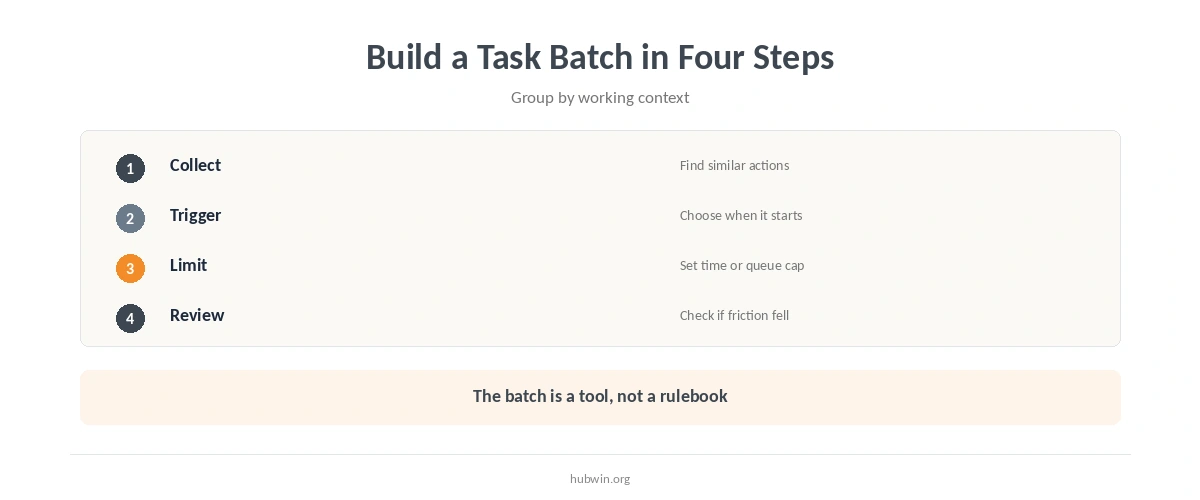
To batch tasks when working from home, start with tasks that share setup. Examples include answering routine messages, processing invoices, editing several images, updating records, or making a series of short administrative calls. Similar tasks can reuse the same files, applications, reference material, and decision rules.
That does not mean every task of the same category belongs together. If one message requires long analysis, move it into a separate focused block. Do not let one complex item expand the entire communication batch.
Why Switching Costs Make Batching Plausible
Laboratory task-switching research consistently finds a performance cost immediately after a switch. Rubinstein, Meyer, and Evans found that alternating tasks added switching time, with larger costs as rules became more complex. Reviews of the task-switching literature also describe slower or less accurate responses after a change of task.
Those experiments are not the same as a normal workday. They do not prove that every real-world switch is harmful. They support a narrower idea: changing task rules has a cognitive cost. Unnecessary back-and-forth is therefore a reasonable target for workflow design.
Choose Batches That Have a Natural Trigger
A useful batch starts because something observable happened. A scheduled time may arrive, a queue may reach a small threshold, or a focus block may end. Triggers make the system easier to follow than vague intentions such as “do email later.”
For communication-heavy work, combine batching with the deep-work protection guide. For mixed days, the focus-and-calls guide helps separate high-attention production from meeting-heavy periods.
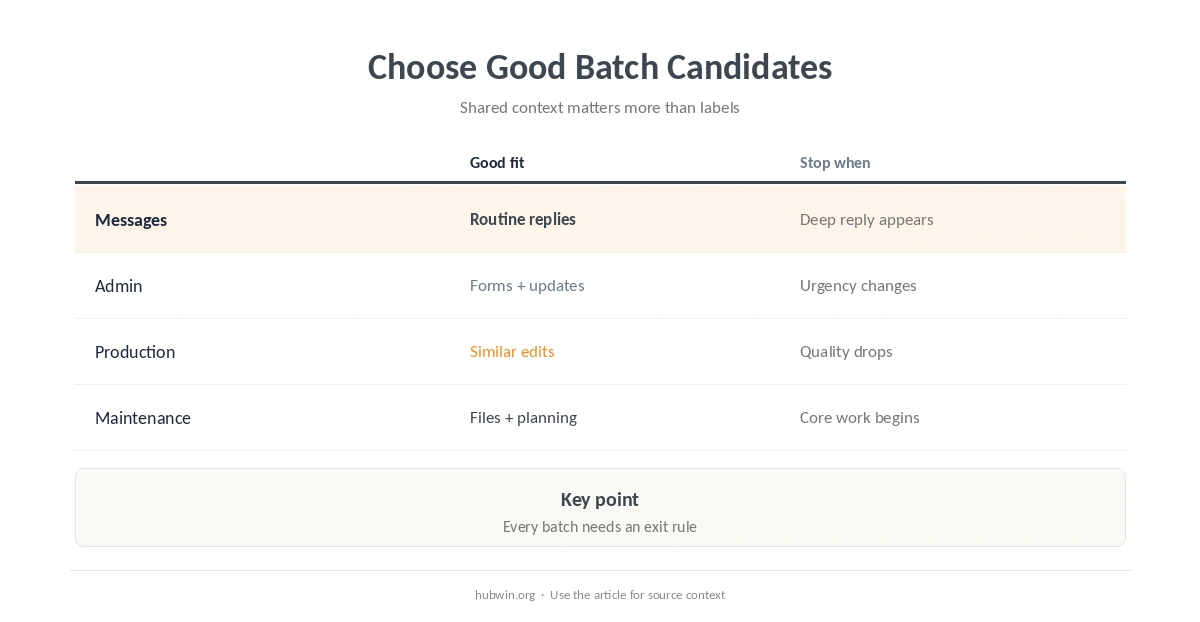
| Batch type | Good fit | Stop the batch when |
|---|---|---|
| Messages | Routine replies + triage | A reply needs deep work |
| Admin | Forms, receipts, updates | Urgent priority appears |
| Production | Similar edits or exports | Quality starts dropping |
| Maintenance | Files, desk, planning | Core work window begins |
Set a Limit So the Batch Does Not Become a Backlog
When you batch tasks when working from home, watch the waiting queue. Batching can fail when that queue becomes too large. Give each batch a maximum time or workload and allow exceptions for genuinely time-sensitive work. The method should reduce switching while preserving responsiveness where responsiveness matters.
This is also why batching is different from simply ignoring notifications. The interruption guide covers outside demands, while avoiding context switching focuses on protecting the task you already chose.
Do Not Batch Work That Needs Immediate Feedback
Some tasks lose value when delayed. A customer escalation, a live collaboration issue, or a blocker for another person may need prompt handling. Build exception rules before the day starts so urgency does not have to be re-decided every time.
Likewise, avoid batching tasks merely because they look similar. If each item needs a different research trail or creative direction, the supposed batch may still require repeated context rebuilding. Group by actual working context, not by label alone.
Review Whether the Batch Reduced Friction
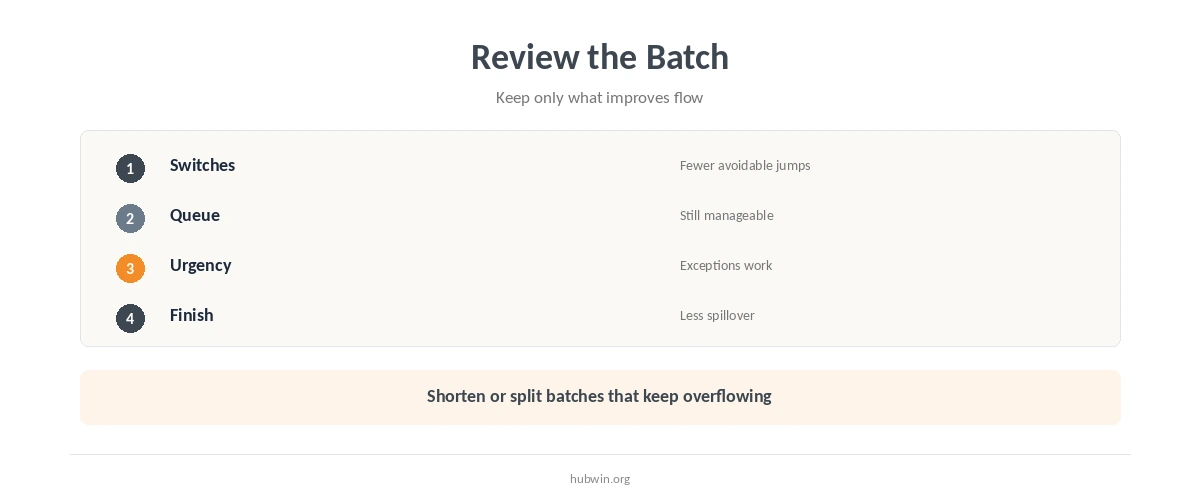
After several workdays, check whether you started important work faster, switched applications less often, and ended with smaller unfinished queues. If a batch constantly spills over, shorten its scope or schedule it more often.
You can combine this review with weekly planning, the end-of-day checklist, or a shutdown ritual. Keep the batching rule only if it improves the workflow you actually have.
Batch Tasks When Working from Home Without Over-Scheduling
Batch tasks when working from home only where the grouping removes repeated setup. Leave open space for unexpected work, breaks, and tasks that need longer concentration. A flexible batch is more useful than a calendar packed with tiny categories. That is how to batch tasks when working from home without making the schedule brittle.
If you tend to over-plan, pair the method with simple work habits and the broader work-from-home productivity guide. The system should make the day easier to run, not add another layer of administration. If starting is the bigger issue, use the procrastination guide instead.
How We Research Task Batching
Direct research on every form of workplace batching is limited, so HubWin does not claim that batching is universally superior. The rationale comes from controlled task-switching research plus workplace studies that examine interruptions and email-use patterns. We use those findings to support a cautious workflow recommendation rather than a promised productivity effect.
Sources reviewed October 9, 2026 include Rubinstein, Meyer, and Evans 2001 and a 2010 task-switching review. We also reviewed the CHI 2016 email-batching study and a Microsoft Research diary study. Read how HubWin researches articles.
Routine communication, small administrative actions, similar production steps, and recurring maintenance tasks are common candidates because they can share tools and context.
There is no universal duration. Set a limit that keeps the queue manageable and leaves room for higher-priority work.
No. Time blocking reserves time on the calendar; batching decides which similar tasks should be handled together. You can use either method alone or combine them.
Not if the delay creates a real problem. Define exceptions so genuinely time-sensitive work can bypass the normal batch.