
This article is general information, not medical advice. If pain is severe, lasting or getting worse, talk to a doctor. Read our health disclaimer.
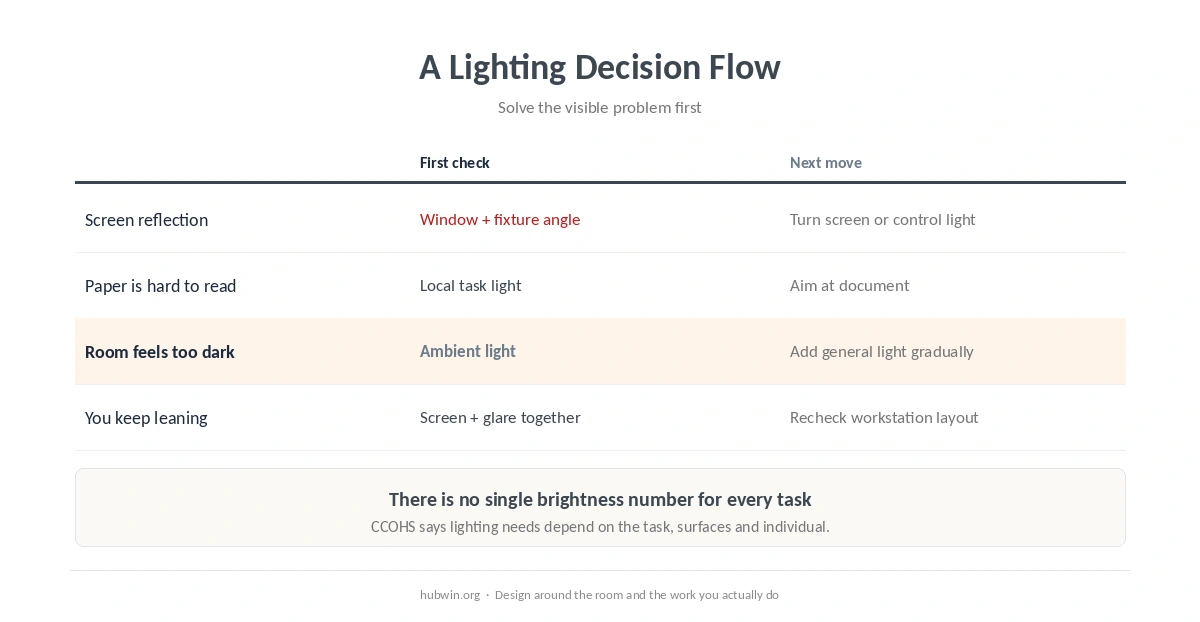
Good home office lighting is less about finding one “perfect” brightness and more about making the screen, documents and room comfortable to see without troublesome glare. CCOHS says lighting needs vary with the task, surfaces and the individual. OSHA also flags screen reflections that make users squint or adopt awkward positions. Start with placement and glare control before buying brighter bulbs. See the CCOHS lighting guidance.
Home Office Lighting Starts With Glare Control
Look at the screen from your normal working position. If you can see a bright window, lamp or ceiling fixture reflected in it, change the geometry first. OSHA recommends placing a monitor perpendicular to a window. CCOHS also suggests blinds or curtains for daylight, matte finishes where reflections are a problem, and adjustable local lighting when the task needs it. Read OSHA monitor guidance. For that specific layout, see closet office.
- Turn the screen relative to windows. OSHA recommends placing the monitor perpendicular to a window to reduce glare.
- Use blinds or curtains when daylight changes. The goal is control, not eliminating daylight.
- Move or diffuse harsh light sources. Fix a reflected hotspot before simply increasing screen brightness.
- Use task light for paper when needed. Aim it at the document, not at the monitor.
- Match screen brightness to the room. Avoid an extreme contrast between a glowing screen and a very dark workspace. For that specific layout, see home office for a designer.

Screen placement and lighting interact. If you are still craning or leaning after controlling reflections, check monitor height and monitor distance. The computer eye strain guide covers symptoms and when eye discomfort needs more than a lighting change.
Home Office Lighting Should Fit the Task, Not One Internet Number
Home office lighting should not be reduced to one universal lux target. CCOHS notes that required illumination depends on the type of task, surrounding surfaces, the work area and individual vision. Its office guidance also distinguishes between screen work and reading paper documents, which can need different local lighting. For a home office, that means the useful question is whether each task is easy to see without glare or extreme contrast. For a related evidence check, see plants and indoor air quality.
A desk lamp can be useful when you read or write on paper, while the monitor already produces its own light. CCOHS recommends placing task lighting so it illuminates the document without reflecting on the screen. This is often more flexible than making the whole room brighter.

Build Home Office Lighting Around the Room You Actually Have
Home office lighting in small rooms and bedrooms often needs compromises. Put the desk where you can control window light, then use a local lamp for the work surface if the general room light is not enough. The bedroom office guide and small home office guide cover layout constraints. For a broader setup review, use the home office ergonomics checklist.
If you are building from scratch, the beginner home office guide helps you prioritize the workstation before accessories. Lighting should support that workstation, not dictate an awkward desk position just because a lamp or outlet happens to be nearby. For that specific layout, see home office for customer support.
How We Research
HubWin uses official ergonomics guidance rather than lighting-product claims. We read current OSHA Computer Workstations guidance and CCOHS pages on lighting surveys, office eye discomfort and telework. We checked the sources on October 8, 2026. Where guidance depends on the task, we keep that uncertainty instead of turning it into one universal brightness target. Learn how HubWin researches articles.
FAQ
Use controllable general light, manage window and fixture glare, and add local task light when paper work needs more illumination.
Not necessarily. For a monitor, OSHA recommends a position perpendicular to the window to reduce glare problems.
Not always. A task lamp is most useful when a specific task, such as reading paper, needs more local light.
No. Too much light can create glare and large brightness differences. The useful level depends on the task and room.
Lighting can remove a visual stressor, but persistent or worsening symptoms should not be assumed to come only from the room. See the linked eye-strain guide for medical red flags.
The Bottom Line
Set up home office lighting by controlling glare first, then adding only the light the task needs. Place the monitor with windows and fixtures in mind, use task lighting for documents, and avoid chasing one brightness number for every room and every person.