
This article is general information, not medical advice. If pain is severe, lasting or getting worse, talk to a doctor. Read our health disclaimer.
How high should your monitor be? For a typical desktop setup, the official sources reviewed here place the top of the screen around eye level or slightly below, with the display directly in front of you. The exact wording differs between OSHA, HSE and CCOHS, so this guide keeps those differences visible instead of collapsing them into one made-up measurement. For that workstation detail, see ergonomic setup for tall users.
How High Should Your Monitor Be? The Short Answer
OSHA says the top of the monitor should be at or slightly below eye level. HSE’s DSE guidance dated March 20, 2025 says the top of the screen should be level with the eyes. CCOHS says the top of a tall or portrait monitor should not be higher than the user’s eye level.
Therefore, a practical starting point is to place the top edge near eye level and avoid routinely looking upward. Then adjust for screen size, posture and corrective lenses. The goal is a display you can view while the head stays balanced instead of tipped back.

How High Should Your Monitor Be According to OSHA?
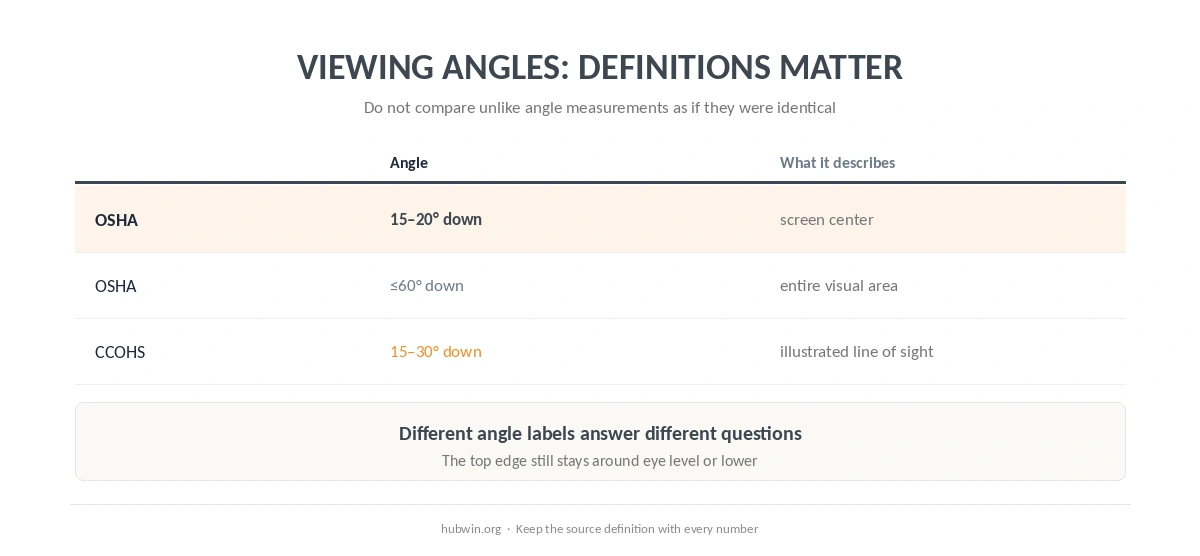
OSHA’s monitor guidance, checked October 7, 2026, gives two useful reference points. First, it places the top of the monitor at or slightly below eye level. Second, it says the center of the monitor should normally sit 15 to 20 degrees below horizontal eye level.
OSHA also says the entire visual area should stay within a downward viewing angle no greater than 60 degrees in its reference postures. That wider limit describes the visible screen area, while the 15-to-20-degree figure describes the normal center position. They are not competing “ideal” numbers. So when you ask how high should your monitor be, first separate the center-angle guidance from the top-edge guidance. If that setup matches your space, see ultrawide monitor.
How HSE and CCOHS Describe Monitor Height
HSE uses a simpler instruction: top of screen level with eyes. CCOHS explains the issue through viewing angles and says recommendations differ between guidelines. Its monitor figure illustrates a downward line of sight of about 15 to 30 degrees.
| Source | Top-of-screen guidance | Additional angle guidance |
|---|---|---|
| OSHA | At or slightly below eye level | Center normally 15–20° below horizontal |
| HSE | Level with eyes | Uses a simple setup rule rather than a center-angle number |
| CCOHS | Do not place top above eye level for tall or portrait monitors | Figure illustrates about 15–30° downward |
Do Not Raise the Screen Just Because It Is Large
CCOHS specifically warns that a tall or portrait display should not push the top above eye level. OSHA likewise notes that a monitor placed too high can make the user tilt the head and neck backward. Therefore, large screens often need more distance or a lower position, not a higher stand. A related ergonomics guide covers monitor arm vs monitor stand.
In addition, monitor size changes where the center falls relative to the top edge. That is another reason to use the eye-level rule as a starting point and then check whether you can view the main content without routinely lifting or dropping the head. In practice, how high should your monitor be still comes back to a forward-facing head position and a screen that does not make you look up. For that specific layout, see monitor light.
Bifocals and Progressive Lenses Are an Important Exception
OSHA says bifocal users may need the monitor lower than the recommendation for non-bifocal users because looking through the lower portion of the lens can otherwise make them tilt the head back. CCOHS makes the same practical point for bifocals, trifocals and progressive lenses.
Therefore, “eye level” is not a rule that overrides your lenses. Lower the screen enough to keep the neck in a comfortable viewing posture. If you cannot read clearly without repeated head movement, an eye-care professional can advise on the prescription and viewing distance that fit your needs.

How High Should Your Monitor Be With Two Screens?
CCOHS says monitors used equally should sit in front with the edges touching and should stay at the same height. If one screen is primary, put that display directly in front and the secondary screen to one side. OSHA’s evaluation checklist uses the same primary-monitor-first logic.
The important point is not to raise one screen merely because it sits off to the side. Instead, keep the main display where the neck can remain forward-facing. If you split time evenly, bring both screens into a shallow arc so you can shift your gaze with less body twisting.
Set Monitor Height After Chair and Desk Height
Monitor height depends on eye height, and eye height depends on how you sit or stand. Therefore, set the chair and keyboard relationship first. Our correct sitting posture guide covers that base position. Then move the monitor to meet your eyes.
This order also follows our office ergonomics guidelines: body and input devices first, screen second. Otherwise, you may raise the chair to fix the keyboard and accidentally leave the monitor too low, or lower the chair and leave the monitor too high. If that is the adjustment you are working on, see dual monitor.
A Fast Monitor-Height Check
- Face forward. Put the primary display directly in front instead of working with the neck turned.
- Relax the head and neck. Do not lift the chin to see the main content area.
- Check the top edge. Start around eye level or slightly below, depending on the source and your lenses.
- Check the center. OSHA normally places the center 15–20 degrees below horizontal eye level.
- Adjust for lenses and screen size. Lower a monitor when corrective lenses or a tall display make you tip the head back.
Related: If that is the part of the setup you are working on next, continue with our neck-pain guide.
How We Research
HubWin does not diagnose neck or vision problems and does not test monitors. The HubWin Team read OSHA’s monitor guidance, checked October 7, 2026; HSE’s DSE posture guidance dated March 20, 2025; and CCOHS’s monitor-positioning fact sheet, last revised November 29, 2022 and confirmed current July 21, 2025. See About HubWin for our method.
FAQ
Start with the top of the screen around eye level or slightly below and keep the display directly in front. Then adjust for screen size, posture and corrective lenses.
OSHA does not say that. It normally places the center of the monitor 15 to 20 degrees below horizontal eye level.
Routine upward viewing is a sign to reassess the setup. OSHA and CCOHS both caution against placing the display too high. A related ergonomics guide covers desk setup for glasses wearers.
Often, yes. OSHA and CCOHS both note that corrective-lens users may prefer a lower monitor so they do not tip the head backward.
CCOHS says multiple monitors should be at the same height. Put the primary one directly in front if you use it more.
Bottom Line
How high should your monitor be? Start with the top around eye level or slightly below, and keep the primary display directly in front. OSHA normally places the screen center 15–20 degrees below horizontal eye level, while CCOHS illustrates a broader downward viewing zone. Lower the display when corrective lenses or a tall screen would otherwise make you tip the head back. For that specific layout, see corner desk.