
This article is general information, not medical advice. If pain is severe, lasting or getting worse, talk to a doctor. Read our health disclaimer.
Computer eye strain is uncomfortable. The American Academy of Ophthalmology (AAO) said in 2024 that long screen use does not permanently damage the eyes. The AAO (2024) says device use can still leave vision blurry and eyes dry, achy or uncomfortable. In addition, Mayo Clinic guidance checked in 2026 lists several symptoms. They include burning or itching eyes, dryness or watering, blurred or double vision, and headache. A separate Myths & Facts guide looks at screen time.
Computer Eye Strain: Start With Distance, Height, and Glare
Two authoritative sources describe screen distance in slightly different ways. The AAO (2024) suggests about 25 inches (64 cm), roughly an arm’s length. It also suggests a slightly downward gaze. HSE guidance from 2025 also uses about an arm’s length. Similarly, HSE places the top of the screen level with the eyes. Our monitor-distance guide keeps those differences visible instead of choosing one magic number.
HSE (2025) says the screen should sit directly in front of the user. The AAO (2024) recommends adjusting room lighting and screen contrast to reduce glare. Our monitor-height guide covers the height details. The small-office setup guide covers light and layout. A comfortable setup can reduce one source of computer eye strain. However, it cannot rule out dry eye, uncorrected vision or another eye condition. A separate Myths & Facts guide looks at blue light glasses.

Computer Eye Strain and Breaks: What the Guidance Says
The AAO (2024) recommends the 20-20-20 rule. Every 20 minutes, look at something at least 20 feet (6 m) away for at least 20 seconds. HSE (2025) does not set one universal interval. Instead, it says short breaks taken often are generally better than longer breaks taken less often. Our microbreak guide keeps those recommendations separate rather than presenting one timer as treatment.
Mayo Clinic guidance checked in 2026 notes that people tend to blink less while using computers. That can contribute to dry-eye symptoms during screen work. Therefore, breaks can interrupt continuous near focusing and give you a chance to blink normally. For long laptop sessions, our laptop setup guide shows how separate input devices can free the screen position. For a wider check, use the home-office ergonomics checklist.

A Practical Screen-Work Sequence
- Set viewing distance first. AAO (2024) uses about 25 inches (64 cm); HSE (2025) uses about an arm’s length.
- Place the screen for easy viewing. HSE (2025) puts the top of the screen at eye level, while AAO (2024) suggests a slightly downward gaze.
- Reduce obvious glare. AAO (2024) recommends adjusting room lighting and screen contrast when glare is a problem.
- Break up continuous screen focus. AAO (2024) recommends 20-20-20; HSE (2025) favors short, frequent breaks without claiming one universal schedule.
- Recheck the whole workspace. Light, screen position, chair setup and input-device reach can interact, so review them together.
When to See a Doctor
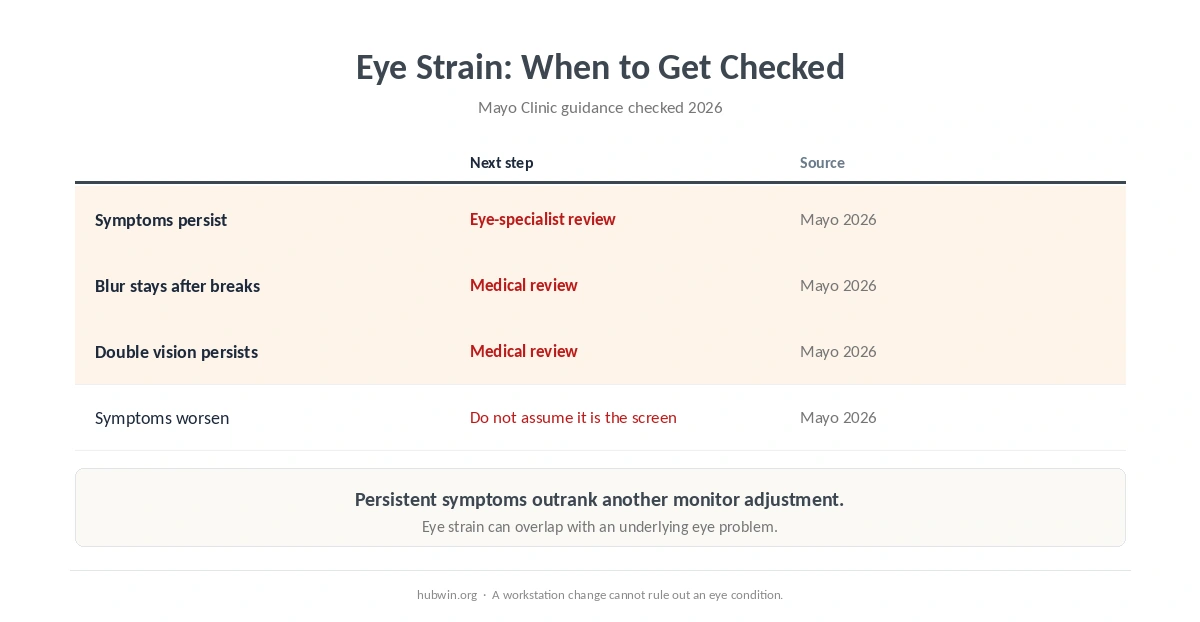
Mayo Clinic guidance checked in 2026 says to see an eye specialist when self-care does not relieve eyestrain. Similarly, the AAO (2024) gives advice when computer-related eye symptoms continue after the screen task changes or stops. Persistent computer eye strain deserves an eye check rather than endless workstation tweaking.
Mayo Clinic guidance checked in 2026 lists blurred or double vision among eyestrain symptoms. It also notes that an underlying eye problem can sometimes cause or worsen symptoms. If vision changes persist, seek medical care. Do the same if symptoms worsen or basic screen changes do not help. Do not assume the computer is the only cause. A related Health & Comfort guide covers breathing exercises and the limits of setup changes.
How We Research
HubWin checked the American Academy of Ophthalmology computer-use guidance, published June 27, 2024. We also checked Mayo Clinic eyestrain guidance. Finally, we checked HSE display-screen guidance dated March 20, 2025. HubWin rechecked all sources on October 8, 2026. See About HubWin for our research method.
FAQ
The AAO (2024) says long use of digital screens does not permanently damage the eyes. It can still cause temporary discomfort, blurry vision, dryness or aching.
AAO guidance from 2024 suggests about 25 inches (64 cm), roughly arm’s length. HSE (2025) also uses about arm’s length, while other ergonomics agencies publish broader ranges.
The AAO (2024) recommends it as a practical break rule. HSE (2025) also favors short, frequent breaks, although it does not prescribe one universal interval.
Mayo Clinic guidance checked in 2026 says to see an eye specialist when self-care does not relieve eyestrain. If vision changes continue or symptoms worsen, do not write them off as a desk problem.
Bottom Line
Computer eye strain is usually about temporary discomfort, not permanent screen damage, according to AAO guidance from 2024. Start with sensible viewing distance, glare control and breaks, then judge the result. If symptoms persist or vision changes continue, Mayo Clinic guidance checked in 2026 supports getting an eye specialist involved. For a related evidence check, see dark mode.