
This article is general information, not medical advice. If pain is severe, lasting or getting worse, talk to a doctor. Read our health disclaimer.
How to adjust an office chair properly starts with your body, not the desk. Set the seat so your feet are supported and the chair fits your legs. Then fit the backrest and armrests. Finally, bring the work surface to your elbows instead of twisting your posture to match fixed furniture. Our sitting posture guide shows the body position this setup is trying to support.
How to Adjust an Office Chair Properly: The Short Answer
First, set the seat height so the feet rest flat on the floor or on a stable footrest. Next, check that the front edge of the seat does not press into the lower legs. Then move the backrest to support the lower back and set the armrests low enough that the shoulders remain relaxed.
CCOHS says an “ergonomic chair” is not automatically ergonomic for every person. Its chair fact sheet, confirmed current June 1, 2026, says the chair must fit the user, the workstation and the task. Therefore, brand labels matter less than whether the adjustment range actually fits you. So how to adjust an office chair properly is ultimately a fit question, not a label on the chair. A related ergonomics guide covers ergonomic setup for tall users.
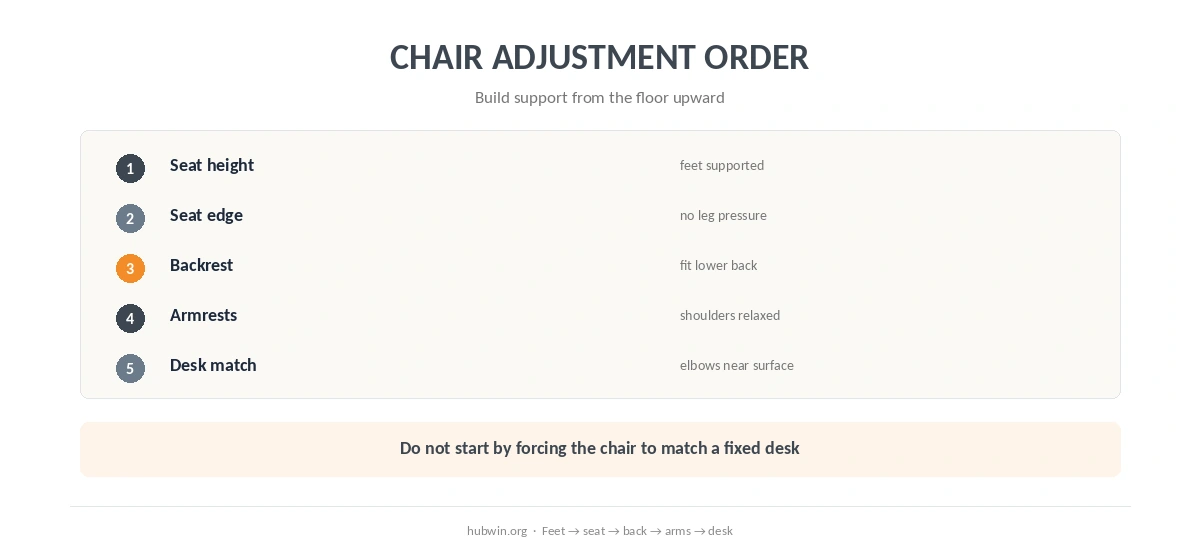
How to Adjust an Office Chair Properly in Seven Steps
- Start with seat height. Sit with the feet supported instead of dangling.
- Check the front edge. Leave useful space so the seat does not press into the back of the lower legs.
- Fit the backrest. Move it so the lower back has support without forcing the torso forward.
- Set seat depth if adjustable. Keep thigh support while preserving clearance behind the knees or calves.
- Set armrests. Let them meet the forearms or elbows without lifting the shoulders.
- Move close to the desk. Armrests should not block access to the keyboard and mouse.
- Only then judge desk height. Bring the work surface toward elbow height or use a footrest or keyboard tray when needed.
Set Seat Height for Feet and Thigh Support
OSHA’s computer-workstation guidance says the feet should rest fully on the floor or on a footrest. It also says the thighs and hips should have support. Therefore, seat height is not simply “knees at 90 degrees.” The chair should support the legs while still letting the feet carry stable contact below.
HSE’s 2025 guidance says seat height should support both the front and back of the thighs. Meanwhile, CCOHS says to start by standing in front of the chair and setting the highest point of a horizontal seat just below the kneecap, then sit down and fine-tune.
Seat-Edge Clearance: HSE and CCOHS Use Different Checks
The official sources do not use one identical seat-depth number. HSE says to leave 0.8–1.2 inches (2–3 cm) between the front edge of the seat and the back of the knee. CCOHS uses a different practical check: about a clenched fist, roughly 2 inches (5 cm), between the front edge of the seat and the lower legs or calves.
Therefore, treat both numbers as fit checks rather than a universal chair specification. The shared goal is clear: the seat should support the thighs without pressing into the back of the legs, and the back should still reach the backrest.

Adjust the Backrest Before the Armrests
CCOHS says the backrest should move forward and backward as well as up and down so it fits the hollow of the lower back. OSHA also calls for lower-back support. However, do not use the backrest position to compensate for a chair that sits too far from the desk.
After the backrest, set the armrests. CCOHS says to let the arms hang loosely, bend the elbows to about 90 degrees, and raise the armrests until they barely touch the undersides of the elbows. If the armrests push the elbows upward, lower or remove them. That also helps with the keyboard and mouse position.
How to Adjust an Office Chair Properly at a Fixed Desk
A fixed desk changes the order of compromises. CCOHS says that if the work surface is too high, raise the chair until the elbows sit about level with the work surface. Then use a footrest if the feet no longer rest flat on the floor. This is also why how to adjust an office chair properly depends on whether the work surface can move.
However, if the desk is so low that your legs cannot fit or move freely underneath it, CCOHS says the workstation is too low for regular use. In that case, changing the chair alone cannot solve the mismatch. See our ideal sitting desk height guide for the desk side of the setup.

Armrests Should Support, Not Block the Desk
CCOHS notes that armrests can be a problem when they stop the chair from getting close enough to the desk. Its adjustment page says shorter armrests that extend 10 inches (25 cm) or less from the seat back may allow closer access. This is a design example, not a rule that every chair needs that exact length.
OSHA makes the same functional point: armrests that are too high can elevate the shoulders, while armrests that are too wide can pull the elbows away from the body. Therefore, the right armrest position is the one that supports without changing the natural shoulder position.
Do Not Freeze Yourself in One “Perfect” Chair Position
OSHA says there is no single correct posture that fits everyone. It also encourages frequent position changes. Similarly, CCOHS says a workstation should allow voluntary changes in working position and active rest.
In practice, a well-adjusted chair gives you a supported starting point, not a command to remain still for hours. The broader office ergonomics guidelines explain why adjustability and movement matter together.
Related: For the next step, use our guide to what an expensive office chair actually buys. If the second issue is closer to your problem, see the chair-versus-desk guide.
How We Research
HubWin does not test office chairs or diagnose pain. The HubWin Team read CCOHS How to Adjust Office Chairs, confirmed current February 4, 2025; CCOHS Ergonomic Chair, confirmed current June 1, 2026; HSE DSE posture guidance dated March 20, 2025; and OSHA chair guidance, checked October 7, 2026. See About HubWin for our method.
FAQ
Set seat height and foot support first, then seat depth, backrest and armrests. Only after that should you fit the chair to the desk and keyboard.
OSHA says feet should be supported by the floor or a footrest. If desk height forces you to raise the chair, a footrest can restore support.
HSE says 0.8–1.2 inches (2–3 cm) behind the knee. CCOHS uses a different check of about 2 inches (5 cm) between the seat edge and the calves.
CCOHS says properly set armrests can barely touch the underside of the elbows when the arms hang naturally. They should not lift the shoulders.
No. CCOHS says the chair is only one component. Desk, keyboard, monitor, foot support and movement also matter.
Bottom Line
How to adjust an office chair properly comes down to fit and sequence. Support the feet, fit the seat to the legs, support the lower back, keep armrests from lifting the shoulders, and then match the work surface to the elbows. If the desk prevents that relationship, change the workstation instead of forcing the body to adapt. For that workstation detail, see dining chair.