
A weekly review for remote work is a short audit of your commitments before you plan the next week. First, collect loose tasks, check what changed, close stale items, and identify what still needs a next action. Then plan from that cleaner list instead of rebuilding your whole system from memory.
This is different from planning your week as a remote worker. That article focuses on the week ahead. By contrast, the review looks backward and sideways first: unfinished work, waiting items, calendar changes, and commitments that no longer belong on the active list.
Weekly Review for Remote Work: The Short Answer
A weekly review for remote work works best when it answers four questions: What did I capture, what changed, what still matters, and what needs a concrete next step? Therefore, the review should update your system before it assigns time. The goal is not to create a perfect dashboard. The goal is to make your task list and calendar trustworthy enough to use next week.
If your daily workflow already uses a work-from-home productivity checklist, keep that checklist operational and keep the weekly review strategic. Also, use the review to notice patterns that daily routines hide, such as recurring spillover, meetings that create follow-up work, or tasks that repeatedly move without a decision.

How to Create a Weekly Review for Remote Work
David Allen Company describes the GTD Weekly Review as a regular process for getting clear, current, and creative. Its published checklist includes collecting loose material, reviewing action lists and calendars, checking waiting items, and reviewing projects. However, you do not need to adopt the full GTD system to use that logic in a home-office review.
- First, gather loose inputs. Bring together notes, flagged messages, downloads, paper reminders, and tasks parked in random apps.
- Next, clean the active task list. Mark finished items, delete work that no longer matters, and rewrite vague entries as visible next actions.
- Then, scan the past calendar. Capture follow-ups from meetings, deadlines, and personal appointments that created work.
- After that, scan the upcoming calendar. Notice preparation work before you fill open time with optional tasks.
- Also, review waiting items. Decide whether to follow up, keep waiting, or close the loop.
- Then, review active projects. Make sure each current project has a next action or a deliberate pause.
- Finally, plan the next week. Only after the system is current should you choose priorities and place time-sensitive work.
For scheduling, connect the final step to your existing time-blocking approach instead of duplicating the calendar. In addition, protect a small amount of unscheduled space. A weekly plan that fills every open block cannot absorb normal remote-work changes.
What Belongs in a Weekly Review
The review should include commitments that can disappear between home and work contexts. For example, compare your task list with the way you separate work and life at home. A household task that blocks a work deadline belongs in the review because it changes the plan, even though it is not a work project.
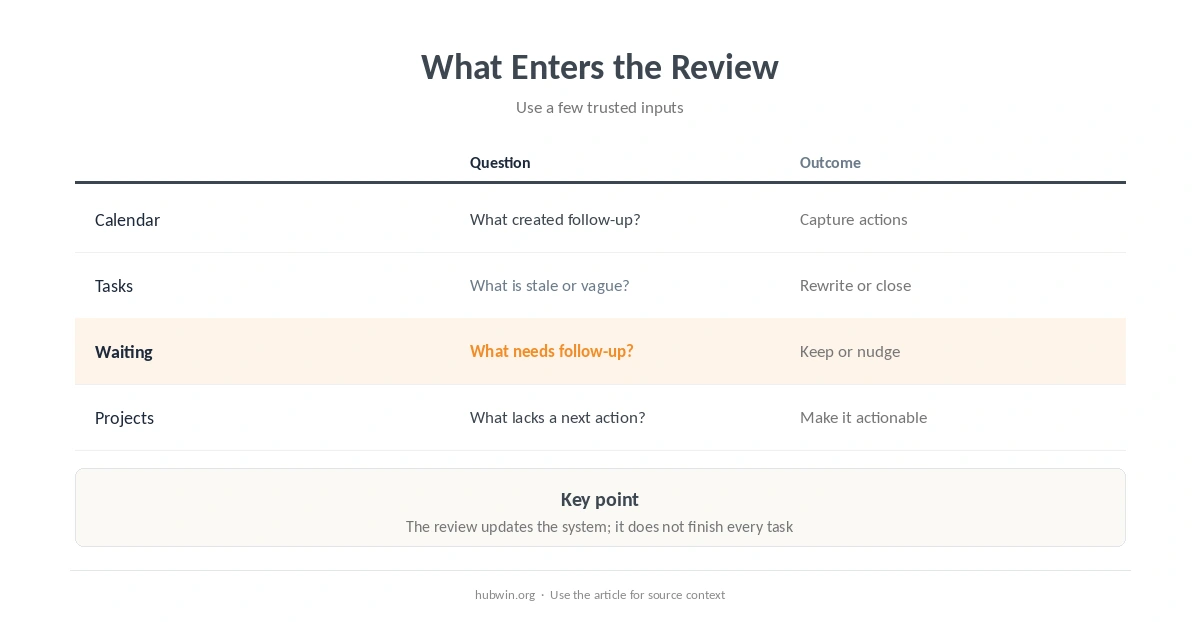
| Area | Review question | Useful outcome |
|---|---|---|
| Calendar | What created follow-up work? | Missing actions captured |
| Task list | What is finished, stale, or vague? | Current next actions |
| Waiting | Who or what am I waiting for? | Follow-up or deliberate wait |
| Projects | Does each active outcome have a next step? | Projects remain actionable |
| Boundaries | What is spilling into personal time? | One boundary to reinforce |
If interruptions dominate the week, add one note about what repeatedly broke focus and compare it with your interruption strategy. Likewise, if noise keeps changing the plan, use the review to decide whether the issue belongs in scheduling or in your home-office noise setup.
Keep the Review Separate from Daily Shutdown
A weekly review should not replace your shutdown ritual after work. The shutdown ritual closes one day. In contrast, the weekly review reconciles several days of commitments and checks whether the system still reflects reality.
The same distinction applies to an end-of-day checklist. Therefore, do not repeat every daily step on Friday. Pull only the information that needs a wider view, such as repeated carryover, overdue follow-ups, or a project that lacks a next action.
How to Keep a Weekly Review for Remote Work Useful
A weekly review for remote work becomes less useful when it turns into a catch-all work session. Instead, treat discovered work as work to schedule unless it takes almost no thought to close. This keeps the review focused on decisions rather than completion.
If you keep postponing the review, attach it to a stable cue from your work-from-home schedule. Also, reduce friction before adding motivation: keep one review checklist, one task system, and one calendar. Multiple parallel lists make the review spend its energy on reconciliation.
Masicampo and Baumeister reported in a 2011 series of experiments that making specific plans for unfulfilled goals reduced their cognitive interference. However, that study did not test remote workers or weekly reviews directly. It supports the narrower idea that explicit planning can help close mental loops; it does not prove that a Friday ritual will make you more productive.
If your main issue is fragmented attention, connect the review to how you avoid context switching at home. If your main issue is deep work, instead use it to protect the blocks described in protecting deep work time.

How We Research
HubWin treats the weekly review as a planning practice, not a medical or performance guarantee. We read the David Allen Company Weekly Review material and the 2011 Masicampo and Baumeister paper on plan making on October 9, 2026. You can review the David Allen Company Weekly Review steps and the PubMed record for the planning study. See How HubWin researches articles for our source model.
Weekly Review for Remote Work: Common Questions
No. Instead, a review updates the system first, while weekly planning chooses what to do next.
No. However, GTD provides a clear primary-source example of a structured review process.
Sometimes. However, the review usually stays clearer when you capture and schedule work instead of turning every discovery into a work session.
Restart with the current calendar, active tasks, waiting items, and projects. Then ignore the urge to reconstruct every detail you missed.
Finally, put time-sensitive commitments on the calendar and keep the rest in your trusted task system.
A weekly review for remote work should leave you with a current system, not a heroic plan. Therefore, finish by choosing a few real priorities, then return to your normal remote-work routine. The review has done its job when Monday starts from clear commitments instead of scattered reminders.