
Good home office cable management begins with safety, not with making every wire invisible. OSHA guidance checked in 2026 identifies computer cords in walkways as trip hazards. Its office safety manual says to position extension cords away from tripping or slipping hazards. Trace the power path first, then organize the desk end. A related organization guide covers charger organization.
Home Office Cable Management Starts With the Power Path
For home office cable management, map the outlet, power connection, desk and walking path before you attach anything. The small home office setup helps when furniture placement is still flexible, while the bedroom office guide covers shared rooms where cables can easily cross circulation space. If you are still changing the workstation, finish that layout before permanent cable routing.
OSHA office safety guidance checked in 2026 says to remove defective extension cords from service. It also says to keep cords out of doorways where a closing door can damage them. Those are workplace rules, and residential electrical requirements vary by location, but the practical lesson is simple: damaged cords and improvised permanent extension-cord runs are not organization problems. If the room lacks suitable power where the desk needs it, use a qualified local solution rather than hiding a risky cable route. For that storage or organization question, see home office organization.

Home Office Cable Management: Route, Secure, Then Label
Once the power path is safe, home office cable management becomes a routing and maintenance task. Route cables so normal desk movement still works. A monitor cable needs enough slack for the final screen position. A laptop setup may need extra movement when you remove the computer. The ergonomic laptop setup and keyboard and mouse position guide are worth finishing before you tighten bundles, because cable tension should not pull equipment away from its usable position.
Keep serviceability in mind. Group power separately from loose accessory leads where practical, label both ends of cables that look alike, and leave connectors reachable without dismantling the desk. If you are working within a fixed budget, the budget home office guide helps decide which setup problems deserve spending before cosmetic cable accessories.
| Check | Good outcome | Why it matters |
|---|---|---|
| Walkway | No loose cord crosses normal foot traffic | OSHA identifies cords in walkways as trip hazards |
| Doorway | Cord is not pinched by a closing door | OSHA office guidance warns against doorway damage |
| Cord condition | No damaged insulation or defective connector | Remove damaged cords from service |
| Desk slack | Equipment reaches its final working position without cable tension | Organization should not change the workstation fit |
| Access | Power and data connections remain reachable | Future changes do not require cutting apart the whole bundle |

A Practical Cable-Organization Order
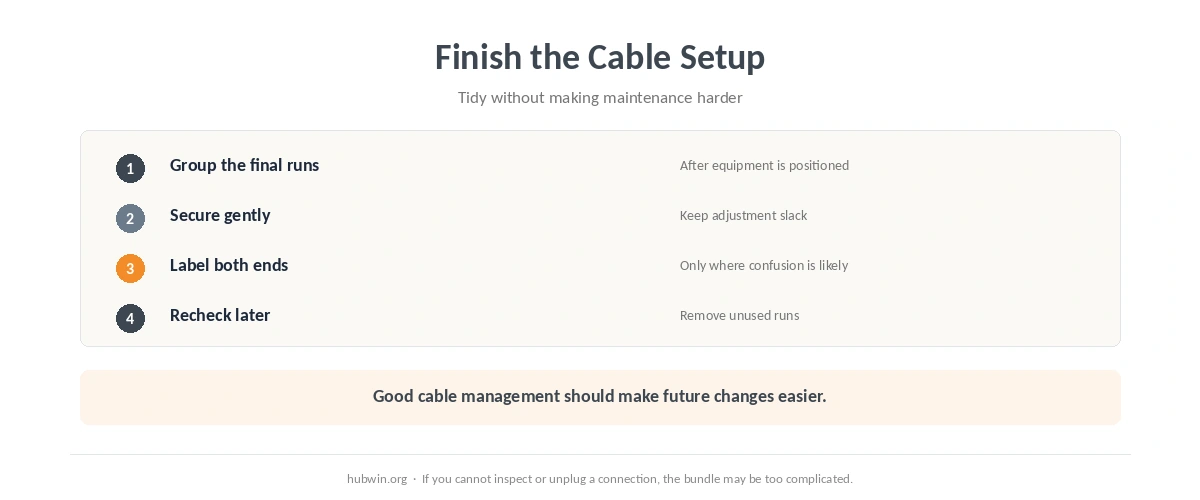
- Trace power. Identify the outlet and every device that needs power before routing desk cables.
- Clear the walking path. Do not leave a loose cord where feet, chair casters or a closing door can damage it.
- Set the equipment first. Confirm the final monitor, laptop, keyboard and mouse positions.
- Secure without over-tightening. Leave enough slack for normal adjustment and connector access.
- Label the confusing runs. Mark both ends when several similar cables meet under the desk.
- Recheck after a week. Remove dead cables and adjust any bundle that makes maintenance difficult.
Finally, secure the cables and run the home office ergonomics checklist. That catches a common organization mistake: moving equipment to suit the wires instead of routing the wires to suit the working position.
Related: For the next step, use our quick decluttering guide. If the second issue is closer to your problem, see the small-desk organization guide.
How We Research
HubWin checked the OSHA Field Safety and Health Management System manual, Chapter 6, including its office guidance for extension cords, and the OSHA hazard-identification training tool, which identifies computer cords in walkways as trip hazards. We also checked CCOHS workspace-planning guidance revised in 2026. We rechecked the sources on October 8, 2026. See About HubWin for our research method.
FAQ
Trace the power path from outlet to desk before bundling anything. Make sure normal walking paths and doorways do not depend on a loose or easily damaged cord.
No. A cable route should remain safe, accessible and easy to inspect. Hiding a damaged or overloaded connection does not make the setup better.
OSHA office safety guidance says to keep extension cords out of doorways where a closing door can damage them. Residential rules vary, so use appropriate local electrical guidance for the home.
Enough for equipment to reach its final working position without pulling on connectors or changing the ergonomic setup. There is no useful universal inch measurement because equipment and desk layouts differ.
After the route works. Label both ends of similar power, display or data cables so future troubleshooting does not require tracing every run from scratch.
Bottom Line
Useful home office cable management follows a simple order: safe power path, clear walkways, final equipment position, secure routing, then labels. Do not let a cleaner-looking desk hide damaged cords or force equipment into a worse position. The best cable layout is one you can inspect and change without rebuilding the office.