
This article is general information, not medical advice. If pain is severe, lasting or getting worse, talk to a doctor. Read our health disclaimer.
The ideal desk height for standing is the height that brings the keyboard and mouse to your standing elbows while your shoulders stay relaxed. CCOHS states this directly for sit-stand desks, and OSHA’s purchasing guide uses the same elbow-height principle. The exact inch value therefore depends on your body rather than on one “standard” standing desk setting. For that related claim, see the evidence on standing desks and back pain.
Ideal Desk Height for Standing: The Short Answer
For computer work, the ideal desk height for standing puts the platform or keyboard approximately at your standing elbow position. CCOHS’s sit/stand desk fact sheet, revised in 2022, says your arms should stay in the same general position they use when you sit. It also describes relaxed shoulders, elbows close to the body and elbows bent about 90 degrees. A separate Myths & Facts guide looks at standing desks versus walking.
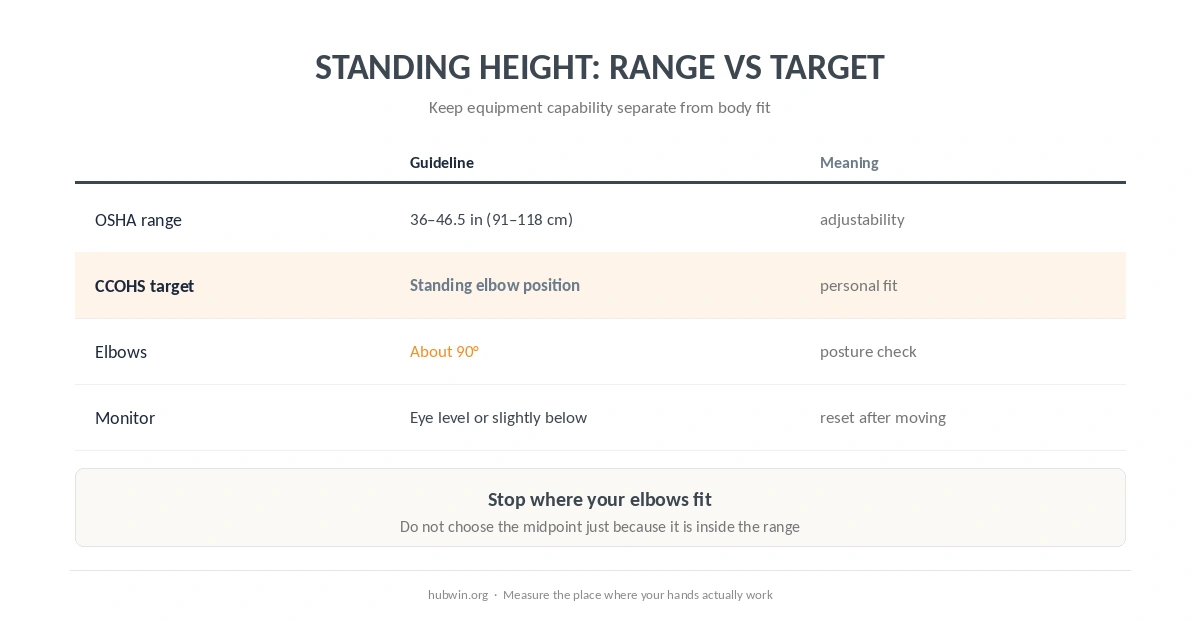
OSHA’s purchasing guide, checked October 7, 2026, says keyboard height should adjust from 36 to 46.5 inches (91 to 118 cm) for standing tasks and should be about elbow height. That 36–46.5-inch (91–118-cm) span is an equipment adjustment range. It is not a recommendation to choose a number from the middle without measuring yourself.
How to Find the Ideal Desk Height for Standing
Stand in the shoes you normally use for work. Then relax the shoulders and let the upper arms hang naturally. Bend the elbows so the forearms are close to level. Finally, move the desk or keyboard surface to meet the hands instead of lifting the shoulders to meet the desk. That body-fit check is how you find the ideal desk height for standing without guessing from stature.
Penn EHRS makes the same practical recommendation in home-office guidance last revised July 29, 2025: keep the keyboard at elbow height while standing, with the arms close to the sides and the shoulders relaxed. In practice, this body check is more defensible than a height-only calculator.
The OSHA Standing Range Is Not Your Personal Target
| Measurement | What the source says | How to use it |
|---|---|---|
| Standing keyboard adjustment | 36–46.5 inches (91–118 cm) | OSHA equipment range, not one target |
| Keyboard/platform position | Approximately standing elbow height | CCOHS body-fit target |
| Elbow position | About 90° while standing | CCOHS neutral-position check |
| Monitor position | Eye level or slightly below | CCOHS; reset after desk moves |
This distinction matters because a standing desk can be technically inside the OSHA range and still be wrong for the person using it. For example, a shorter user may still shrug at a high setting. A taller user may drop the wrists or round the upper back at a low setting.

Set the Standing Desk, Then Reset the Monitor
Changing from sitting to standing moves your eye level as well as your elbow level. Therefore, a sit-stand workstation needs two adjustments, not one. CCOHS says the monitor should remain between horizontal and 35 degrees below the horizontal line of sight in its standing setup guidance. A separate Myths & Facts guide looks at standing desk myths.
For a broader monitor rule, OSHA says the top of the screen should be at or slightly below eye level. HSE’s 2025 DSE guidance uses “top of screen level with eyes.” Those wordings are close, but they are not identical. Our office ergonomics guidelines keep the sources separate for that reason.
Standing Desk Setup in Three Passes
- Set the hands. Put keyboard and mouse near standing elbow height while shoulders stay down and wrists stay straight.
- Set the eyes. Raise or lower the monitor after the desk moves so you do not tip the head up or bend forward.
- Set the stance. Avoid locking the knees. Change weight position, and use a footrest when it helps you vary the stance.
CCOHS also recommends supportive footwear and says a footrest can help you shift weight. Penn EHRS similarly advises changing position regularly and not locking the knees. Standing is therefore a posture option, not a reason to stay motionless for the rest of the day.

Do Not Copy a Standing Height From Someone Else
Overall stature does not tell you exactly where your elbows sit. Two people with the same height can have different leg, torso and upper-arm proportions. Shoes and anti-fatigue mats can also move the body relative to the desk. Therefore, your standing elbow measurement should override a generic chart. For a related evidence check, see anti-fatigue standing mats.
In addition, desktop thickness matters. If the keyboard rests on the desktop, the work-surface height and keyboard height are almost the same. However, a thick keyboard, tray or converter can shift the hand position. Measure the place where your hands actually work.
What If the Desk Will Not Go Low or High Enough?
If the surface cannot reach your elbows without shoulder lift or wrist bend, the desk does not fit that standing posture. Do not compensate by holding the shoulders up. Instead, change the keyboard platform, converter or work surface so the input devices can reach you.
Likewise, avoid a monitor compromise that forces the head backward just because the desk reached a comfortable keyboard height. A separate monitor arm or stand can decouple screen height from keyboard height.
How Long Should You Stand?
CCOHS says published schedules vary widely and emphasizes alternating position as needed. OSHA’s neutral-position guidance also tells users to change working position frequently. Therefore, the goal is not to discover one perfect standing duration. It is to create a workstation that lets you change position without losing the basic fit.
For the seated half of a sit-stand setup, use our correct sitting posture guide. The same principle applies in both modes: support the body, bring the input devices to the hands, and put the display where you can view it without routine neck bending.
Related: For the next step, use our desk-height chart. If the second issue is closer to your problem, see the evidence guide on standing all day.
How We Research
HubWin uses a research model rather than product testing. The HubWin Team read CCOHS’s Sit/Stand Desk fact sheet, last revised November 30, 2022; OSHA’s purchasing guide and neutral-position guidance, checked October 7, 2026; and Penn EHRS home-office guidance, last revised July 29, 2025. We also checked HSE’s March 20, 2025 DSE posture page. See About HubWin for our research method.
FAQ
For computer work, set the keyboard or work platform around your standing elbow height with relaxed shoulders and straight wrists.
A 42-inch (107-cm) setting may fit some people, but official guidance does not make it a universal target. Measure your standing elbow position instead.
OSHA’s purchasing guide says keyboard height should adjust from 36 to 46.5 inches (91 to 118 cm) for standing tasks. That is an equipment range.
Move it when the sit-to-stand change leaves the screen too high or too low for your new eye level. Reset it so the top stays around eye level or slightly below and you do not tip the head back.
No official source reviewed here recommends staying in one standing posture all day. CCOHS and OSHA emphasize changing position.
Bottom Line
The ideal desk height for standing is your standing elbow height translated into a keyboard position. Use OSHA’s 36–46.5-inch (91–118-cm) range to judge whether furniture has enough adjustment, not to choose a personal number blindly. Set the hands first, reset the monitor second, and keep changing posture rather than trying to stand perfectly still.