
This article is general information, not medical advice. If pain is severe, lasting or getting worse, talk to a doctor. Read our health disclaimer.
Office ergonomics guidelines are more consistent than their different numbers make them look. OSHA, HSE and CCOHS all start with the same idea: fit the workstation to the person, keep the main equipment close and centered, support the body, and change position instead of holding one pose all day. OSHA’s Computer Workstations eTool, checked in 2026, even says there is no single correct posture or arrangement that fits everyone. For a related evidence check, see a realistic ergonomic setup.
Office Ergonomics Guidelines: The Short Answer
The safest way to read office ergonomics guidelines is as a set of ranges and design goals, not a body-position formula. OSHA’s current eTool, checked in 2026, calls for neutral alignment, back and foot support, relaxed shoulders, straight wrists, and a monitor in front of the user. Meanwhile, HSE’s 2025 DSE guidance puts the screen at eye level and about an arm’s length away, with the keyboard just below elbow height. For that workstation detail, see dual monitor.
CCOHS makes the same point about individual fit. Its monitor fact sheet, last revised in 2022 and confirmed current in 2025, says viewing-angle and viewing-distance recommendations differ between guidelines. Therefore, CCOHS treats those numbers as starting points that should be adjusted for the user, screen and task.
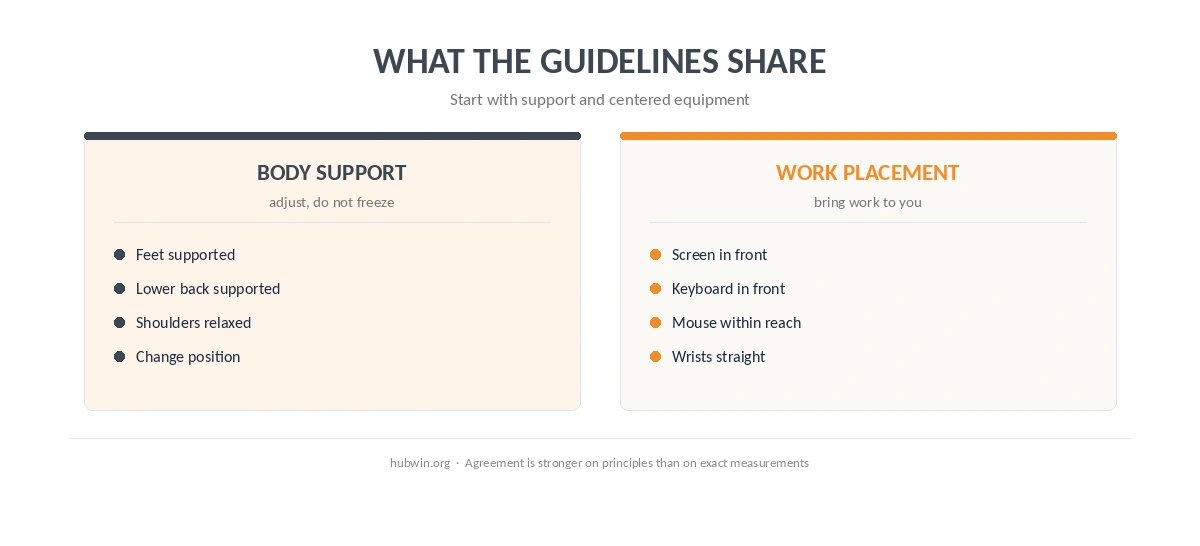
Where the Office Ergonomics Guidelines Agree
First, all three sources put the screen in front of the user. OSHA’s eTool, checked in 2026, says the head, neck and torso should face forward. HSE’s 2025 guidance likewise says the screen and keyboard should be central so the user does not twist the back.
Second, the keyboard and mouse should support a relaxed upper body. OSHA’s keyboard guidance, checked in 2026, says the keyboard belongs directly in front, with relaxed shoulders, elbows close to the body and wrists straight. CCOHS’s 2022 keyboard fact sheet uses almost the same language and gives an elbow range of about 90 to 110 degrees. For a related evidence check, see home office ergonomics.
Third, the chair should support rather than dictate posture. OSHA’s chair guidance, checked in 2026, calls for lumbar support and feet supported by the floor or a footrest. CCOHS’s chair fact sheet, confirmed current in 2026, also stresses adjustability and warns that armrests can be unhelpful if they stop the user from getting close to the desk. For that workstation detail, see ergonomic keyboard.
| Area | Practical starting point | Named source |
|---|---|---|
| Screen height | Top of screen at eye level or slightly below | OSHA 2026 check · HSE 2025 · CCOHS 2022 |
| Screen position | Directly in front; avoid routine twisting | OSHA 2026 check · HSE 2025 |
| Keyboard | In front, near elbow height; wrists straight | OSHA 2026 check · HSE 2025 · CCOHS 2022 |
| Chair | Support lower back and feet; adjust to the user | OSHA 2026 check · CCOHS 2026 current |
| Movement | Break up prolonged screen work and change posture | HSE 2025 · CCOHS 2026 current |
Where OSHA, HSE and CCOHS Use Different Numbers
Monitor distance is the clearest example. OSHA’s monitor guidance, checked in 2026, gives a preferred viewing distance of 20 to 40 inches (50 to 100 cm). HSE’s 2025 page uses a simpler rule: about an arm’s length. CCOHS’s 2022 monitor fact sheet illustrates 15.7 to 29.1 inches (40 to 74 cm), then says an arm’s length is a useful estimate and that published recommendations differ. If that setup matches your space, see working from a kitchen table.
Those figures should not be averaged into a new “HubWin number.” Instead, start inside the cited range that fits the source you are following. Then make text larger or move the display if you lean forward, tilt your head back or cannot read comfortably. In practice, office ergonomics guidelines are most useful when the source range stays attached to the source that published it. For that related comfort question, see upper back pain.

How to Apply Office Ergonomics Guidelines in Order
The order matters because one adjustment changes the next. For example, raising the chair can improve keyboard height but leave the feet unsupported. Therefore, set the body and input devices first, then place the screen around that position.
- Set chair height and support. Keep the feet supported and the lower back supported; do not raise the chair so high that the feet hang.
- Bring the keyboard and mouse to the body. Keep shoulders relaxed, elbows close, and wrists in line with the forearms.
- Center the screen. Put the primary screen directly in front instead of making the neck stay turned.
- Set screen height and distance. Use the official ranges as a starting point, then adjust so the screen is readable without leaning or looking upward.
- Build movement into the work. Change posture and leave the screen periodically instead of trying to maintain a single “perfect” pose.
HSE’s 2025 work-routine guidance is unusually specific about breaks: short breaks taken often are better than longer breaks taken less often, and it gives 5 to 10 minutes every hour as an example. However, HSE also says there is no single legal break interval for every DSE job.

What These Guidelines Do Not Prove
An official ergonomic recommendation is not a diagnosis and does not prove that one desk setting will prevent every symptom. OSHA, HSE and CCOHS publish workplace guidance for broad populations. As a result, individual vision, body dimensions, disability, task type and existing symptoms can justify a different setup. A related ergonomics guide covers ergonomic setup for short users.
Likewise, a precise angle can create false confidence if the rest of the workstation is wrong. A monitor at the “right” height still fails if it sits off to the side. A keyboard at elbow height still fails if the user must reach for it or bend the wrists. If that is the adjustment you are working on, see desk setup for glasses wearers.
Related: For the next step, use our common home-office mistakes guide. If the second issue is closer to your problem, see the quick-fix guide for a non-ergonomic desk.
How We Research
HubWin uses a research model rather than product testing. For this page, the HubWin Team read OSHA’s Computer Workstations eTool and component pages on October 7, 2026; HSE’s DSE posture and break pages updated March 20, 2025; and CCOHS monitor, keyboard and chair fact sheets with their stated revision or confirmation dates. Our method is described on About HubWin. The central official sources are OSHA, HSE and CCOHS.
FAQ
No. They agree on neutral alignment, support, centered equipment and movement, but some measurements differ. Monitor distance is a clear example.
OSHA says the top should be at or slightly below eye level. HSE says the top should be level with the eyes. CCOHS also advises against placing the top above eye level.
OSHA gives 20 to 40 inches (50 to 100 cm) as a preferred range. HSE says about an arm’s length. CCOHS says published guidance differs and treats an arm’s length as a practical estimate.
No single angle appears across all three sources. OSHA describes neutral positions and gives a broad 90-to-120-degree elbow range in its posture guidance, while CCOHS gives about 90 to 110 degrees for keyboard use.
HSE says there is no universal legal interval. Its 2025 guidance says short, frequent breaks are better and gives 5 to 10 minutes every hour as an example.
Bottom Line
Office ergonomics guidelines work best as a fitting process. Start with support, centered equipment and neutral wrists, then tune monitor height and distance to the person and task. When official sources give different numbers, keep the difference visible instead of inventing a false consensus.