
This article is general information, not medical advice. If pain is severe, lasting or getting worse, talk to a doctor. Read our health disclaimer.
Your desk setup may contribute to pain during computer work, but that pattern does not prove the workstation is the cause. NIOSH’s 2024 ergonomics guidance treats localized fatigue, discomfort and pain that does not settle after rest as signals worth investigating. Therefore, ask whether the symptom pattern points to an avoidable work stressor. A desk setup review can answer that narrower question without claiming to explain the pain. See the 2024 NIOSH guidance. For a related evidence check, see musculoskeletal risk.
Desk Setup and Pain: Look for Patterns, Not a Diagnosis
One clue is repetition. If discomfort appears during one specific task, the workstation deserves a review. Pay attention to repeated reaching, held positions and whether the pain changes when the task changes. However, that pattern cannot rule out another medical cause. HubWin therefore treats ergonomics as risk reduction rather than diagnosis.
OSHA’s current Computer Workstations eTool describes several relevant exposures. They include awkward wrist and arm positions, repeated reaching, unsupported feet or back, prolonged static posture and contact pressure from hard edges. In addition, OSHA recommends arranging components so the body can stay in a neutral range without straining to reach them. Our office ergonomics guidelines summarize those official principles in one place. Read OSHA’s position guidance.
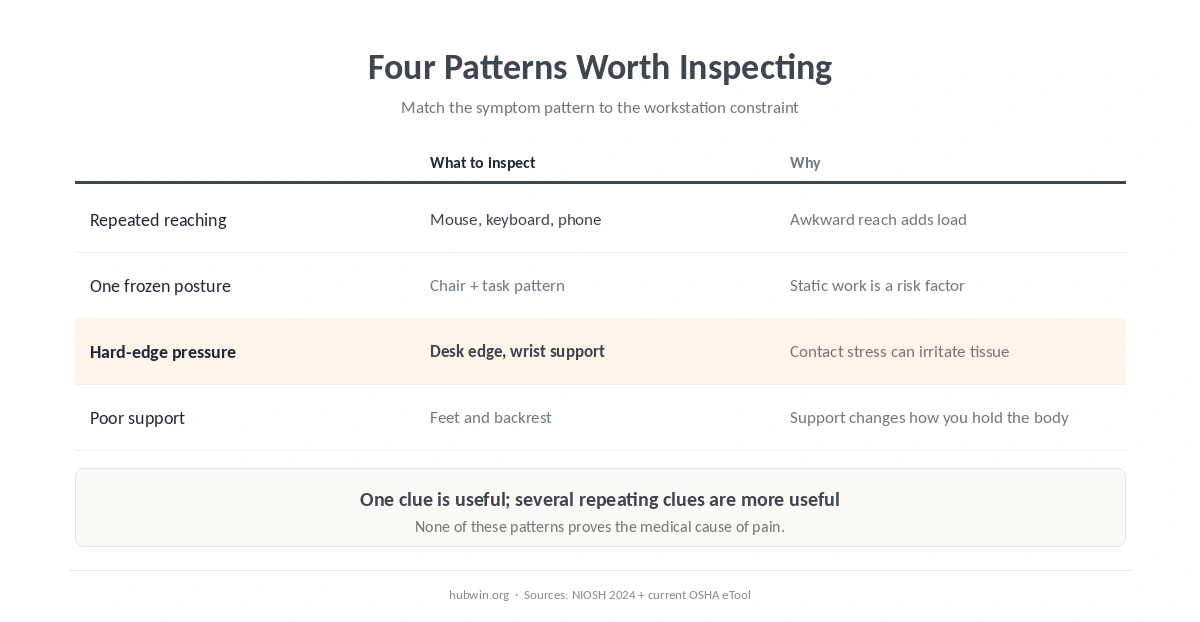
Five Setup Clues Worth Checking
- You have to reach for a tool you use constantly. A mouse, keyboard or phone that sits too far away can keep the shoulder or trunk working in an awkward position.
- Your neutral position is impossible to maintain. If the desk is too high or low for the chair, fixing one body area may create a problem somewhere else.
- A hard edge presses into the forearm or wrist. OSHA describes this as contact stress and recommends changing the arrangement rather than simply tolerating the pressure.
- You stay almost motionless for long blocks. NIOSH identifies static work posture as a low-back risk factor, while OSHA advises changing position through the day.
- Symptoms track one task more than the whole day. That does not prove causation, but it gives you a concrete task and setup to inspect first.
Start with the easiest constraints to see. Check the feet and back first. Then check whether the keyboard and mouse are close enough and whether the screen lets you look forward comfortably. The home office ergonomics checklist gives you a structured pass, while the daily posture checklist works better for a quick repeatable review.
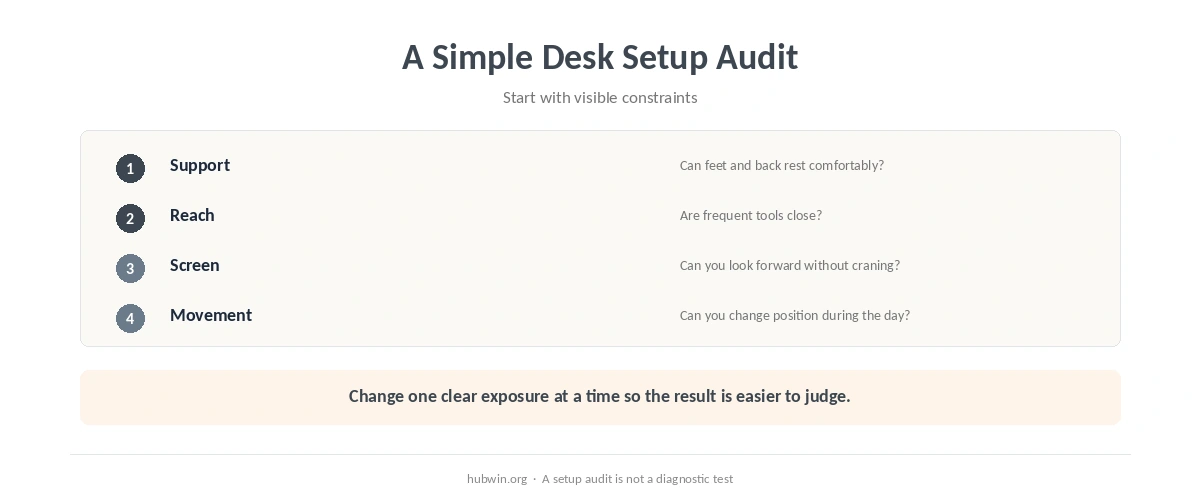
Use the Symptom Location to Choose the First Setup Check
For neck or shoulder discomfort, inspect screen position and repeated reaching before buying new furniture. Our neck-pain desk guide and shoulder-pain guide explain those patterns with medical caveats. For hand symptoms, start with keyboard and mouse placement instead of assuming carpal tunnel syndrome. The keyboard and mouse position guide shows the neutral-position targets from OSHA.
If the symptom is centered at the wrist, our wrist pain and input-device guide adds the medical red flags that setup advice cannot cover.
Lower-back discomfort needs a similar distinction. A chair that does not support the back, feet that cannot reach stable support, or work that forces leaning can add ergonomic stress. Still, our lower-back pain and sitting guide explains why sitting time alone is not enough to identify the cause.
When to See a Doctor Instead of Tweaking the Desk Setup
Pain that keeps returning or does not improve after a reasonable setup change deserves more than another furniture adjustment. NIOSH’s 2024 screening guidance specifically treats pain that does not go away after rest as a sign that warrants attention. The NHS 2026 back-pain guidance lists several reasons for urgent or emergency care. They include sudden severe or rapidly worsening pain, weakness or numbness in both legs, bladder or bowel changes and major trauma. Read the NHS red flags.
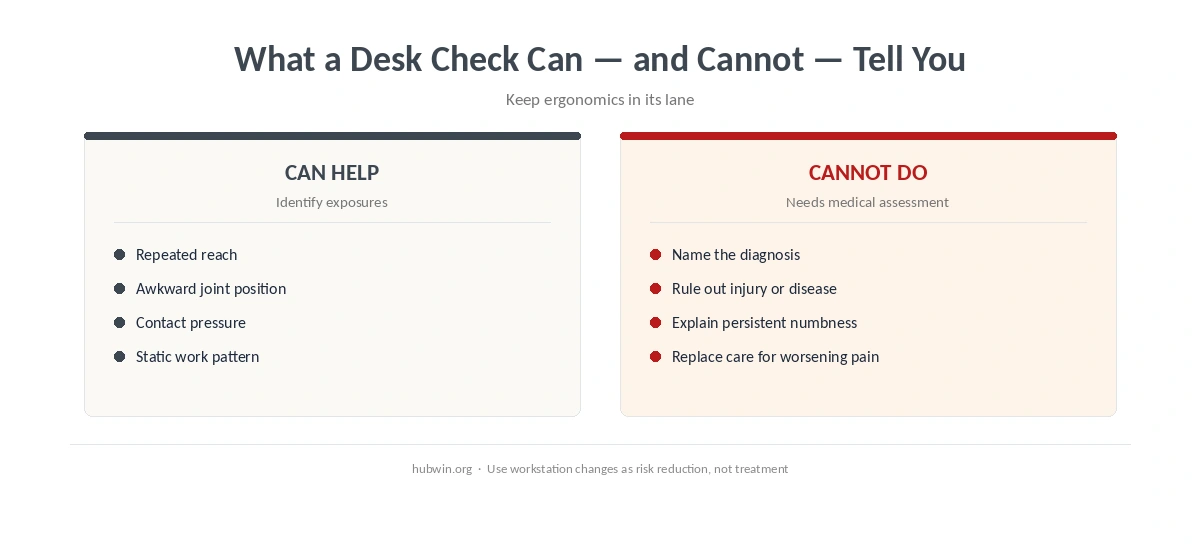
For hand or wrist symptoms, Mayo Clinic says to seek medical care when pain and swelling last more than a few days. The same applies when symptoms get worse. Severe injury, deformity, marked swelling, numbness or difficulty moving the hand also need prompt assessment. In short, a desk review can identify exposures, but it should never become a reason to delay medical care. See Mayo Clinic’s wrist guidance. For that related comfort question, see hand numbness from computer work.
How We Research
HubWin does not examine readers or diagnose work-related conditions. For this article, we read NIOSH’s 2024 ergonomics risk-factor guidance and OSHA’s current Computer Workstations eTool. We also read the NHS back-pain guidance last reviewed in 2026 and Mayo Clinic’s wrist-pain guidance. HubWin checked the sources on October 8, 2026. Finally, we mapped those sources to the workstation checks already used across HubWin so one page does not contradict another. Learn how HubWin researches articles.
FAQ
You cannot confirm the cause from a workstation check alone. Look for repeatable patterns tied to a task or posture, then reduce the relevant ergonomic stressor while watching for symptoms that need medical assessment.
No. Improvement away from a task can make the work pattern worth investigating, but it does not establish a diagnosis or rule out another cause.
Start with support and reach: feet, backrest, keyboard, mouse and screen. Fix obvious constraints before adding accessories.
Not automatically. First check whether the current chair can be adjusted to support the feet and back while keeping the keyboard reachable. A new chair cannot diagnose or treat unexplained pain.
Seek medical advice when symptoms are severe, worsening, persistent, follow an injury, include weakness or numbness, or match other red flags from an appropriate health-service source.
The Bottom Line
A desk setup can coincide with pain, but that relationship is a clue rather than a verdict. A desk setup review should stay focused on exposures you can actually change. Look for repeated reaching, pressure, unsupported positions and long static periods. Then change one clear exposure at a time, while taking persistent or red-flag symptoms to a healthcare professional.