
This article is general information, not medical advice. If pain is severe, lasting or getting worse, talk to a doctor. Read our health disclaimer.
An ergonomic mouse is a pointing device designed around hand position, grip or reduced movement, but there is no universal best shape. Start with the work you actually do: precise cursor placement, all-day spreadsheets, frequent scrolling or very limited desk space. Compare those tasks with how the device moves and how easily your hand reaches its controls.
The key buying question is not whether a mouse looks vertical or sculpted. It is whether you can use it with a light grip, accessible buttons and a mouse position close to the keyboard. OSHA recommends trying pointing devices before extended use and keeping them within comfortable reach.
First, identify which mouse type changes your task
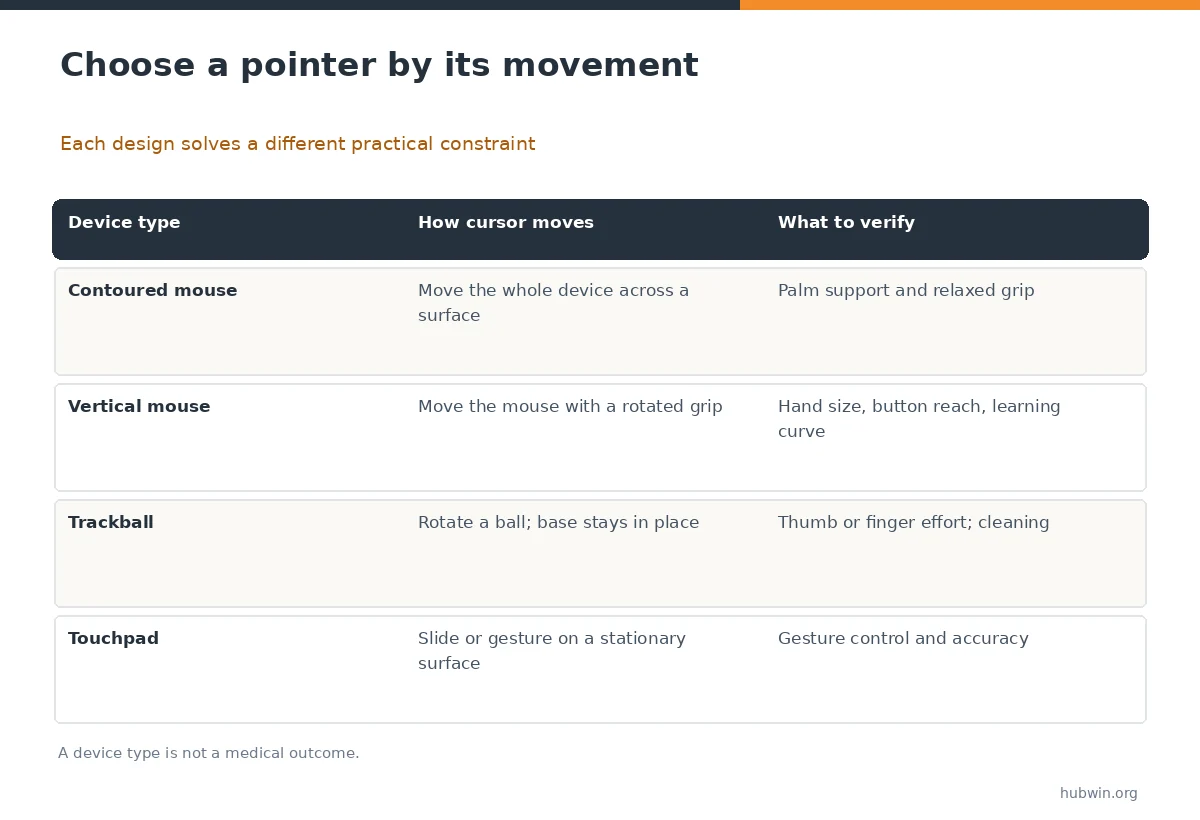
A traditional contoured mouse may suit someone who wants familiar accuracy with modest palm support. A vertical design changes forearm orientation, but the grip angle alone cannot predict comfort. Trackballs keep the base in one place, which can help on cramped surfaces; however, they transfer cursor work to the thumb or fingers.
A touchpad makes gestures and portability convenient, especially on a laptop. It may not give every user the control needed for repetitive drag operations or detailed design. Use the movement matrix below to shortlist designs, not to infer that one prevents injury.
Test shape and size with normal work, not a showroom pose
Hold the mouse loosely. Check whether the main buttons sit naturally under your fingers and whether the scroll wheel requires a stretch. The palm should not have to squeeze a body that is too wide, and fingertips should not crowd around one that is too small. Try actual clicks, scrolling, text selection and dragging.
CCOHS advises choosing a mouse that matches the hand’s size and contour and allows a neutral hand position. For shared workstations, consider whether the device is symmetrical or dedicated to one hand. A strong right-handed shape could be a poor choice for a left-handed colleague.
Check reach, pointer speed, and connection before paying
Place the prospective mouse right beside your keyboard. If a numeric keypad pushes it far away, changing to a more compact keyboard layout may matter more than changing mouse shape. Adjust pointer sensitivity until the cursor moves across your working area without exaggerated wrist movement or repeated lifts.
Choose wired or wireless based on your desk and device support. For wireless models, check pairing method, operating-system compatibility, battery or charging behavior and whether switching between devices requires vendor software. Extra DPI figures and decorative lighting do not establish ergonomic benefit.

Separate feature value from marketing labels
Buttons with a light, predictable actuation can be useful when you click repeatedly. Programmable controls may reduce repetitive navigation, but only if the software works on your computer and you learn the shortcuts. A trackball can avoid sweeping a mouse across a crowded desk, yet thumb-operated versions place more work on the thumb.
Do not assume that an angle printed on a product box means clinically proven comfort. Mouse choice is one part of a workstation: keyboard height, chair support, screen position and task variation also matter. OSHA emphasizes placement and fit over one device category.
Use this comparison before your final purchase decision
Make a short requirements list: which hand you use, your dominant task, available surface, desired connectivity and whether you need device switching. Then test no more than a few well-matched shapes. Avoid choosing solely from online star ratings, because those reviewers may have different hands and tasks.
If a trial or return policy exists, use it for a careful workday evaluation; check the actual seller terms instead of assuming a free return. A device that immediately feels foreign may require some learning, but persistent discomfort is a reason to stop rather than force adaptation.

Decision checklist: when a replacement is justified
Keep the present mouse when it fits, responds reliably and stays within easy reach. Consider a different type when you cannot maintain a comfortable grip, need a smaller working footprint or consistently struggle with required controls. A compact keyboard or pointer-speed adjustment is often a lower-cost first experiment.
If you have ongoing numbness, weakness or persistent hand symptoms, do not rely on a new mouse as treatment. Seek appropriate professional assessment and use equipment changes as separate workstation decisions.
How We Research
We compared OSHA placement and purchasing criteria with CCOHS mouse selection guidance, then organized the decision around grip, movement method, reach and controls. This is a fit checklist rather than a hands-on product test or a claim about medical outcomes. Our methodology and limitations are explained on the About HubWin page.
Sources
OSHA mouse and pointer guidance. Reviewed October 26, 2026.
OSHA workstation purchasing checklist. Reviewed October 26, 2026.
CCOHS mouse selection and use. Reviewed October 26, 2026.
No. A rotated grip can change forearm position, but comfort also depends on hand size, button location, pointer placement and the task. Try one before committing.
It can be practical because the base stays in place. However, thumb or finger operation may not suit everyone, so test scrolling and precise selection.
No. DPI describes sensitivity capability, not a health benefit. What matters in use is a controllable pointer speed that does not demand excessive movement.
A separate mouse may help if the touchpad makes your tasks slow or awkward. Compare it with the space available and whether you already use an external keyboard.
Move it next to the keyboard and check your arm position. If a wide keyboard blocks access, changing the keyboard layout may help before you replace the mouse.