
General workplace information, not individualized medical advice. If discomfort persists or becomes worse, ask a qualified healthcare professional. Read the HubWin health disclaimer.
Desk storage is not simply a choice between a drawer and a shelf. A useful storage system must keep supplies accessible without reducing mouse space, blocking your chair, or filling the area your legs need. The right choice depends on which objects you use during a work block and where those objects can sit without forcing extra reaching.
This is a buying-and-placement decision guide, not a second lesson on decluttering or sorting desk drawers. Start with a small inventory, sketch the desk from above and from the side, then compare drawers, shelves, and under-desk attachments using the same clearance tests. A compact desk can feel larger when you position storage correctly.
Quick answer: what matters most
- Inventory First: List frequent items and measure the largest object.
- Draw The Clear Zone: Keep mouse area and knee clearance unobstructed.
- Verify The Mount: Check material, screw or clamp rules, and rated load.
- Test Access: Simulate opening, chair travel, and cable routing.
Sort by how often an item is reached for
Place a notebook, headset, charger, pens, and whatever else you actually touch during a normal work session on the desk. Mark each item as frequent, occasional, or archived. Frequent items deserve a clear reach path from a seated working position; occasional items can go into a drawer or on a nearby shelf. Archive items rarely belong in the small volume surrounding your keyboard.
A quick inventory prevents buying a visually impressive organizer that solves the wrong problem. Record the largest object rather than just the count of objects: an A4 notebook, for example, may not fit a shallow tray even if several pens do. Photograph the desk during a real work task, not after cleaning it for the photo. This shows which objects compete for the same working area.
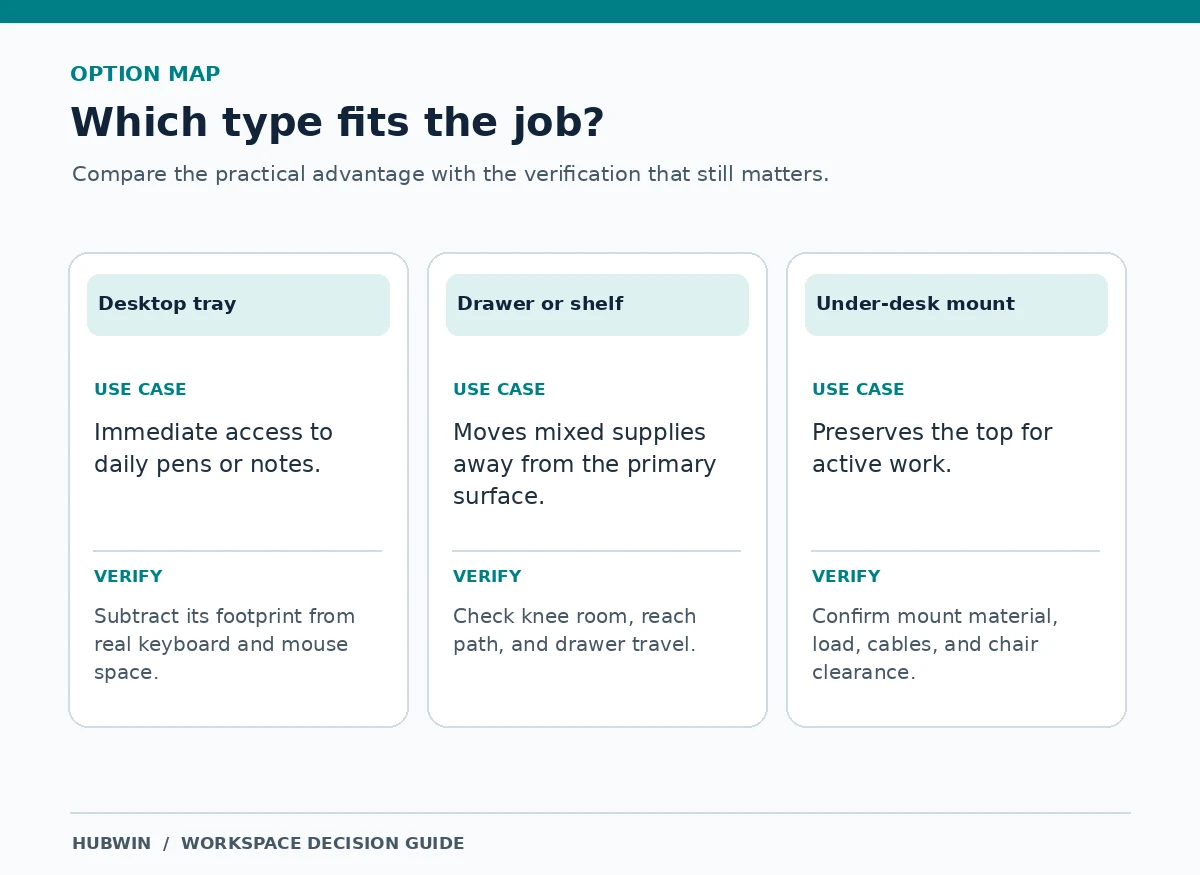
Choose between desktop, drawer, shelf, and under-desk storage
A desktop tray offers immediate access but consumes the most valuable surface area. Sliding drawers hide clutter and can preserve the desktop, yet its depth and handle may interfere with thighs or the chair. Shelves move storage vertically but adds reach and can create a collision point for monitors or moving desks. An under-desk rail or hook can clear the top while creating new snag and knee-contact risks.
Choose the category based on the item: paper and writing tools often fit shallow compartments; books and rarely needed reference items are easier to manage on a nearby shelf; a headset may suit a properly mounted side hook. Do not choose an under-desk solution just because it is invisible. OSHA explicitly warns that stored items can reduce the leg clearance needed for comfortable desk work.
Measure the clearance the storage will occupy
Measure desktop width and depth, then the unobstructed space beneath the front edge while seated. Look at knee room, the route used to pull in the chair, and places where armrests pass under the desk. A hanging drawer takes away vertical space even when it appears slim. A shelf bracket or desk support can remove usable width in the same way.
Sketch the underside from the seated perspective. Draw the drawer at both closed and fully open positions, not only its product dimensions. If you must push the chair back to reach the stored item, note that trade-off. OSHA work-surface guidance emphasizes movement space under the table; treat those published examples as design guidance, not as a universal fit guarantee for every user.

Check mounting method and the actual supported load
Clamp-on accessories may be unsuitable for beveled, hollow-core, glass, or very thin desktop edges. Adhesive-mounted organizers depend on the surface finish and the manufacturer’s installation requirements. Drill-mounted rails require confirmation that the desk panel can safely accept the specified fasteners. A freestanding shelf avoids holes but still needs a stable footprint and sufficient wall or rear clearance.
Check two separate capacities when relevant: the accessory’s load rating and the desk or panel that carries it. Do not infer strength from a photograph showing a laptop or a stack of books. Consider the force exerted when someone pulls a drawer, not only the weight of its contents. If no installation or load information is available, use a simpler freestanding option instead of improvising fasteners.
Keep power supplies and cables out of the storage conflict
A drawer that holds charging accessories can become a pinch point if cords cross the slides. Shelves above a monitor should not conceal stretched video cables or block ventilation openings on electronic equipment. Under-desk baskets are convenient for excess cable length, but they must remain clear of moving desk mechanisms, chair wheels, and any device’s required airflow.
Trace each cord from device to socket or hub with the desk in its normal position. On a sit-stand desk, trace it again at the top and bottom of travel. Use manufacturer-approved routing and avoid packing powered chargers into enclosed boxes without checking ventilation guidance. If you must move a storage unit every time you plug in a peripheral, it may be in the wrong place.

Build a two-zone layout before you buy
Draw a rectangle representing the actual desktop. Reserve an unobstructed central work zone for the keyboard, pointing device, and the work in progress. Mark one accessible storage zone for tools used several times a day, then identify a more distant zone for supplies used weekly. A nearby wall shelf or cabinet may do more than a complicated under-desk system.
Test the layout using cardboard boxes or the empty containers you own. Reach toward them from your normal chair position, open a simulated drawer, and see whether your knees or keyboard path conflict with the proposed placement. Keep the test temporary and secure; it is a way to establish dimensions, not a substitute for properly mounting the final storage unit.
Keep storage useful with a small maintenance rule
Use a one-in, one-out rule for objects in the primary work zone. When a new device arrives, decide which rarely used item should move to the secondary shelf instead. Label closed compartments by purpose instead of creating tiny categories that require repeated sorting. A weekly two-minute review can reveal which storage spaces nobody uses and which remain crowded.
Recheck fasteners, drawer slides, and cable paths after changing the setup. Listen for scraping and look for a shelf that has shifted or a drawer that no longer closes fully. Stop using a damaged mount until you can resolve the problem according to the maker’s instructions. The goal is more working space and easier access, not maximizing the number of containers attached to a desk.
Decision table: match the need to the check
| Your situation | What to verify | What can go wrong |
|---|---|---|
| Daily pens and notes | Desktop footprint and reach | Organizers crowd the mouse |
| Bulk documents | Shelf stability and access | Reaching over the monitor |
| Under-desk charger tray | Cable airflow and fasteners | Cord pinches or overloaded mount |
| Small drawer | Seated knee height and full extension | Chair collision |
How We Research
We compared the space-and-reach trade-offs of storage categories against OSHA desk and clearance guidance. The examples are decision tests, not laboratory product trials; check load limits, clamps, and fastening methods on the specific product and desk. For information on editorial standards and site ownership, see About HubWin. Reviewed October 26, 2026.
Sources
OSHA — Computer Workstations: Desks. Accessed October 26, 2026.
OSHA — Computer Workstations: Work Space and Leg Clearance. Accessed October 26, 2026.
CCOHS — Working in a Sitting Position: Basic Requirements. Accessed October 26, 2026.
No. It frees the visible work surface but may interfere with knees, chair movement, or cables. Compare the actual working clearances before selecting an attachment.
Use drawers for smaller items that need a protected place and shelves for items you use less often. A side shelf may preserve knee room better than an under-desk drawer.
Not safely. Check the clamp opening, desktop material, edge shape, panel thickness, and the maker’s permitted mounting method. Some desktops cannot support that style of accessory.
The tools used repeatedly during the current task, such as the mouse, keyboard, and one active notebook. Less-used supplies can be farther away without slowing normal work.
If it blocks a movement path, requires reaching around the screen, interferes with drawer travel, or eliminates the space needed for your knees, its effective footprint is too large.